0
comments
0
comments
Install Plank LightWeight Dock in Ubuntu 12.10 Quantal/Ubuntu 12.04 Precise/Ubuntu 11.10/Ubuntu 11.04/Linux Mint - (Light Weight)

Plank is meant to be the simplest dock on the planet. The goal is to provide just what a dock needs and absolutely nothing more. It is, however, a library which can be extended to create other dock programs with more advanced features. Thus, Plank is the underlying technology for Docky and aims to provide all the core features while Docky extends it to add fancier things like Docklets, painters, settings dialogs, etc.

To install Plank Dock in Ubuntu/Linux Mint open Terminal (Press Ctrl+Alt+T) and copy the following commands in the Terminal:
Configure Plank Dock:
Plank doesn�t have graphical configuration interface. To configure Plank Dock enter following command in Terminal:
HideMode = 1 means auto hide, set to 0 to disable it.
Position = 3 means the dock location. 0 = left, 1= right, 2 = top, 3= bottom.
To Change Plank Themes:
You can add Plank themes to ~/.config/plank/theme/
Download plank themes from here
Enjoy

Plank is meant to be the simplest dock on the planet. The goal is to provide just what a dock needs and absolutely nothing more. It is, however, a library which can be extended to create other dock programs with more advanced features. Thus, Plank is the underlying technology for Docky and aims to provide all the core features while Docky extends it to add fancier things like Docklets, painters, settings dialogs, etc.
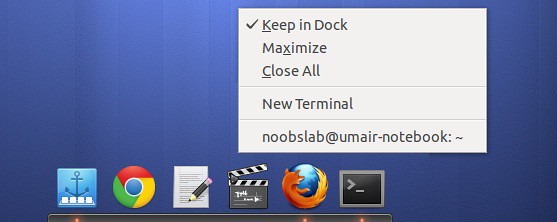
To install Plank Dock in Ubuntu/Linux Mint open Terminal (Press Ctrl+Alt+T) and copy the following commands in the Terminal:
- sudo add-apt-repository ppa:ricotz/docky
- sudo apt-get update
- sudo apt-get install plank
Configure Plank Dock:
Plank doesn�t have graphical configuration interface. To configure Plank Dock enter following command in Terminal:
For Example: edit the configuration file.
- gksudo gedit ~/.config/plank/dock1/settings
HideMode = 1 means auto hide, set to 0 to disable it.
Position = 3 means the dock location. 0 = left, 1= right, 2 = top, 3= bottom.
To Change Plank Themes:
You can add Plank themes to ~/.config/plank/theme/
Download plank themes from here
Enjoy
Source: Launchpad Docky