Warung Bebas
Showing posts with label linux wine. Show all posts

Monday, 20 August 2012

Install Wine 1.5.11 in Ubuntu 12.10/12.04/Linux Mint (New Release)

Install Wine 1.5.11 in Ubuntu 12.04 Precise/11.10/11.04/Linux Mint (New Release)

Wine lets you run Windows software on other operating systems. With Wine, you can install and run these applications just like you would in Windows.
Wine enables Linux, Mac, FreeBSD, and Solaris users to run Windows applications without a copy of Microsoft Windows. Wine is free software under constant development. Other platforms may benefit as well.
winehq ubuntu
What's new in this release:
  • Multi-channel support in the ALSA driver.
  • Removal of the big X11 lock.
  • Support for pair positioning adjustments in Uniscribe.
  • More I/O stream implementations in the C++ runtime.
  • Various bug fixes.

Install Wine in Ubuntu/Linux Mint open Terminal (Press Ctrl+Alt+T) and copy the following commands in the Terminal:
  • sudo add-apt-repository ppa:ubuntu-wine/ppa
  • sudo apt-get update
  • sudo apt-get install wine1.5
  • sudo apt-get install winetricks
Here you can download source of Wine 1.5.11 for other Distro's from Source Forge.
Check announcement of Wine 1.5.11 version.
Enjoy

Wednesday, 1 August 2012

Install Wine 1.5.10 in Ubuntu/Linux Mint (New Release)

Install Wine 1.5.10 in Ubuntu 12.04 Precise/11.10/11.04/Linux Mint (New Release)

Wine lets you run Windows software on other operating systems. With Wine, you can install and run these applications just like you would in Windows.
Wine enables Linux, Mac, FreeBSD, and Solaris users to run Windows applications without a copy of Microsoft Windows. Wine is free software under constant development. Other platforms may benefit as well.
winehq ubuntu
What's new in this release:
  • New version of the Gecko engine based on Firefox 14.
  • Support for OpenGL in the DIB engine using libOSMesa.
  • Off-screen rendering is now the default in Direct3D.
  • Some more WMI infrastructure.
  • Various bug fixes.

Install Wine in Ubuntu/Linux Mint open Terminal (Press Ctrl+Alt+T) and copy the following commands in the Terminal:
  • sudo add-apt-repository ppa:ubuntu-wine/ppa
  • sudo apt-get update
  • sudo apt-get install wine1.5
  • sudo apt-get install winetricks
Here you can download source of Wine 1.5.10 for other Distro's from Source Forge.
Check announcement of Wine 1.5.10 version.
Enjoy

Thursday, 19 July 2012

Install Wine 1.5.9 in Ubuntu 12.04/11.10/Linux Mint (New Release)

Install Wine 1.5.9 in Ubuntu 12.04 Precise/11.10/11.04/Linux Mint (New Release)

Wine lets you run Windows software on other operating systems. With Wine, you can install and run these applications just like you would in Windows.
Wine enables Linux, Mac, FreeBSD, and Solaris users to run Windows applications without a copy of Microsoft Windows. Wine is free software under constant development. Other platforms may benefit as well.
winehq ubuntu
What's new in this release:
  • Support for GPOS font tables in Uniscribe.
  • Support for XRandr 1.2 and 1.3.
  • Parser improvements for the HLSL compiler.
  • More key exchange algorithms supported on Mac OS.
  • Relay tracing on ARM.
  • Various bug fixes.

Install Wine in Ubuntu/Linux Mint open Terminal (Press Ctrl+Alt+T) and copy the following commands in the Terminal:
  • sudo add-apt-repository ppa:ubuntu-wine/ppa
  • sudo apt-get update
  • sudo apt-get install wine1.5
  • sudo apt-get install winetricks
Here you can download source of Wine 1.5.9 for other Distro's from Source Forge.
Check announcement of Wine 1.5.9 version.
Enjoy

Tuesday, 3 July 2012

Install Wine 1.5.8 in Ubuntu/Linux Mint

Install Wine 1.5.8 in Ubuntu 12.04 Precise/11.10/11.04/Linux Mint

Wine lets you run Windows software on other operating systems. With Wine, you can install and run these applications just like you would in Windows.
Wine enables Linux, Mac, FreeBSD, and Solaris users to run Windows applications without a copy of Microsoft Windows. Wine is free software under constant development. Other platforms may benefit as well.
winehq ubuntu
What's new in this release:
  • More stream functionality in the C++ runtime.
  • A number of Windows Codecs improvements.
  • More WBEM classes and properties.
  • Some HTML Help fixes.
  • Support for printing fake italic fonts.
  • Various bug fixes.

Install Wine in Ubuntu/Linux Mint open Terminal (Press Ctrl+Alt+T) and copy the following commands in the Terminal:
  • sudo add-apt-repository ppa:ubuntu-wine/ppa
  • sudo apt-get update
  • sudo apt-get install wine1.5
  • sudo apt-get install winetricks
Here you can download source of Wine 1.5.8 for other Distro's from Source Forge.
Check announcement of Wine 1.5.8 version.
Enjoy

Tuesday, 19 June 2012

Install Wine 1.4.1 on Ubuntu/Linux Mint (New Release)

Install Wine 1.4.1 on Ubuntu 12.04 Precise/Ubuntu 11.10/11.04/10.10/10.04/9.04 or Linux Mint

Wine lets you run Windows software on other operating systems. With Wine, you can install and run these applications just like you would in Windows.
Wine enables Linux, Mac, FreeBSD, and Solaris users to run Windows applications without a copy of Microsoft Windows. Wine is free software under constant development. Other platforms may benefit as well.
winehq ubuntu
What's new in this release:
  • Translation updates.
  • Various bug fixes.
Note: Check Wine 1.5 Version here

Install Wine on Ubuntu/Linux Mint open Terminal (Press Ctrl+Alt+T) and copy the following commands in the Terminal:
  • sudo add-apt-repository ppa:ubuntu-wine/ppa
  • sudo apt-get update
  • sudo apt-get install wine1.4
Here you can download source of Wine 1.4.1 for other Distro's from Source Forge

Saturday, 28 April 2012

Install Wine 1.5.3 in Ubuntu/Linux Mint (New Release)

Install Wine 1.5.3 on Ubuntu 12.04 Precise/Ubuntu 11.10 Oneiric/Linux Mint

Wine lets you run Windows software on other operating systems. With Wine, you can install and run these applications just like you would in Windows.
Wine enables Linux, Mac, FreeBSD, and Solaris users to run Windows applications without a copy of Microsoft Windows. Wine is free software under constant development. Other platforms may benefit as well.
winehq ubuntu
What's new in this release:
  • Support for graphics bounds tracking.
  • A number of fixes to the builtin Internet Explorer.
  • Support for displaying ARM code in the Wine debugger.
  • Various DirectMusic improvements.
  • Better namespace support in MSXML.
  • Various bug fixes.

Install Wine on Ubuntu/Linux Mint open Terminal (Press Alt+F2 and type: gnome-terminal -or- Press Ctrl+Alt+T) and copy the following commands in the Terminal:
  • sudo add-apt-repository ppa:ubuntu-wine/ppa
  • sudo apt-get update
  • sudo apt-get install wine1.5
Here you can download source of Wine 1.5.3 for other Distro's from Source Forge.
Check announcement of Wine 1.5.3 version.
Enjoy

Sunday, 15 April 2012

Install Wine 1.5.2 on Ubuntu 12.04/11.10/Linux Mint via PPA (New Release)

Install Wine 1.5.2 on Ubuntu 12.04 Precise/Ubuntu 11.10 Oneiric/Linux Mint

Wine lets you run Windows software on other operating systems. With Wine, you can install and run these applications just like you would in Windows.
Wine enables Linux, Mac, FreeBSD, and Solaris users to run Windows applications without a copy of Microsoft Windows. Wine is free software under constant development. Other platforms may benefit as well.

winehq ubuntu


What's new in this release:
  • Improved naming scheme for audio devices.
  • Better support for finding system fonts on Mac OS X.
  • Beginnings of support for JPEG encoding.
  • Several printing fixes.
  • Improvements to the URL cache.
  • Various bug fixes.

Install Wine on Ubuntu/Linux Mint open Terminal (Press Alt+F2 and type: gnome-terminal -or- Press Ctrl+Alt+T) and copy the following commands in the Terminal:
  • sudo add-apt-repository ppa:ubuntu-wine/ppa
  • sudo apt-get update
  • sudo apt-get install wine1.5
Here you can download source of Wine 1.5.2 for other Distro's from Source Forge.
Check announcement of Wine 1.5.2 version.
Enjoy

Saturday, 17 March 2012

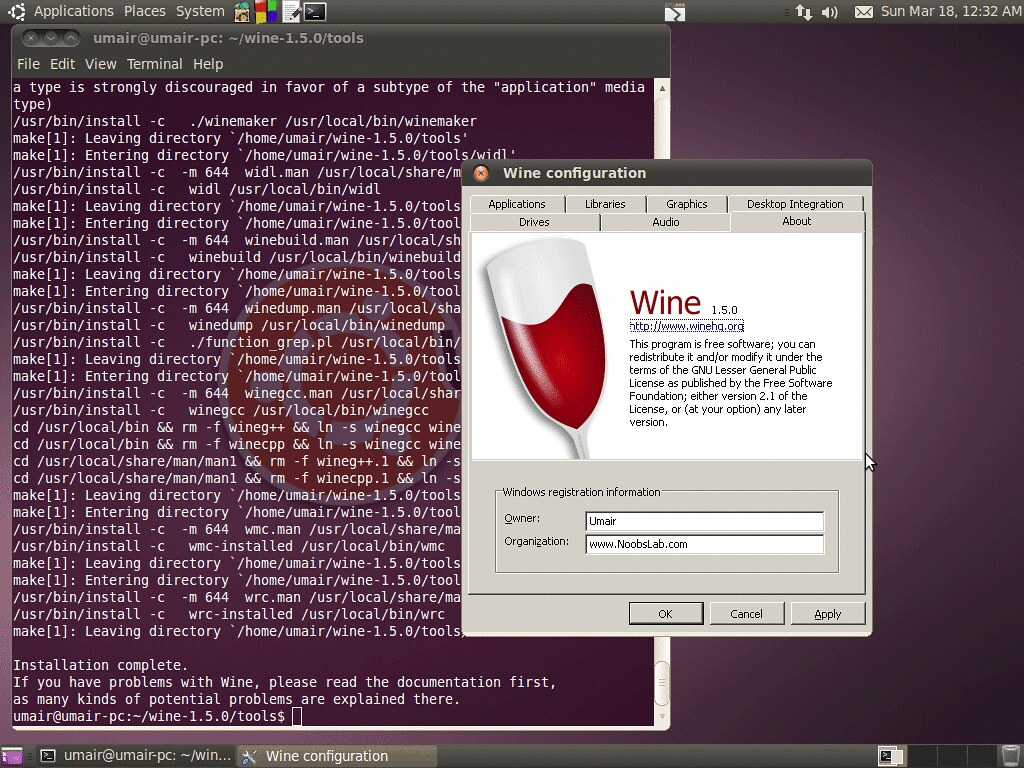
Install Wine 1.5 on Ubuntu/Linux Mint (iTunes 10.x Works)

Install Wine 1.5 on Ubuntu 12.04/11.10/11.04/Linux Mint - Claims iTunes 10.x Works with Wine 1.5

Wine lets you run Windows software on other operating systems. With Wine, you can install and run these applications just like you would in Windows.
Wine enables Linux, Mac, FreeBSD, and Solaris users to run Windows applications without a copy of Microsoft Windows. Wine is free software under constant development. Other platforms may benefit as well.

winehq ubuntu

winehq

What's new in this release:
  • New version of the Gecko engine.
  • Partial support for using the Trash on Mac OS X.
  • Support for path gradients in GdiPlus.
  • Various MSXML improvements.
  • Fixes to 64-bit exception handling.
  • Various bug fixes.
Install released Wine 1.4 with PPA

Install Wine on Ubuntu/Linux Mint open Terminal (Press Alt+F2 and type: gnome-terminal -or- Press Ctrl+Alt+T) and copy the following commands in the Terminal:
  • wget http://prdownloads.sourceforge.net/wine/wine-1.5.0.tar.bz2
  • tar -xjvf wine-1.5.0.tar.bz2
  • cd wine-1.5.0
  • Install some packages
  • sudo apt-get install flex bison qt3-dev-tools qt4-qmake
  • ./configure
  • cd tools
  • ./wineinstall
Here you can download source of Wine 1.5 for other Distro's from Source Forge.
Check announcement of Wine 1.5.0 version.
 

Just the Life of Eddie Copyright © 2012 Best Celebrity Wallpaper -- Powered by Blogger