 0
comments
Install Conky Sample in Ubuntu/12.10/12.04/11.10/any Ubuntu version/Linux Mint/Fedora/Any Distro
Previous Shared many Conky version, I am thinking to make a collection page for conkys gadgets. Many people like conky on their linux desktop. As I experience most popular conky was Conky Infinity and Conky Lua. So today brings for you new Conky Sample. Noobslab made available this conky sample for 1-cpu, 2-core cpu, quad core cpu and also for Gnome Shell + Cinnamon.

Install Conky in Ubuntu/Linux Mint open terminal (Press Ctrl+Alt+T) and copy the following commands in the Terminal:
First of all Download Startup script with following commands:

1st of all install fonts:
Enter following commands in terminal to install fonts:
1: Single 1-Cpu Conky Sample

for (Unity, Gnome Classic, Mate, and other):
To install conky sample in Ubuntu/Mint open Terminal (Press Ctrl+Alt+T) and copy the following commands in the Terminal:
To install conky sample in Ubuntu/Mint open Terminal (Press Ctrl+Alt+T) and copy the following commands in the Terminal:
2: Dual Core 2-Cpu Conky Sample

for (Unity, Gnome Classic, Mate, and other):
To install conky sample in Ubuntu/Mint open Terminal (Press Ctrl+Alt+T) and copy the following commands in the Terminal:
To install conky sample in Ubuntu/Mint open Terminal (Press Ctrl+Alt+T) and copy the following commands in the Terminal:
3: Quad Core 4-Cpu Conky Sample

for (Unity, Gnome Classic, Mate, and other):
To install conky sample in Ubuntu/Mint open Terminal (Press Ctrl+Alt+T) and copy the following commands in the Terminal:
To install conky sample in Ubuntu/Mint open Terminal (Press Ctrl+Alt+T) and copy the following commands in the Terminal:
Previous Shared many Conky version, I am thinking to make a collection page for conkys gadgets. Many people like conky on their linux desktop. As I experience most popular conky was Conky Infinity and Conky Lua. So today brings for you new Conky Sample. Noobslab made available this conky sample for 1-cpu, 2-core cpu, quad core cpu and also for Gnome Shell + Cinnamon.
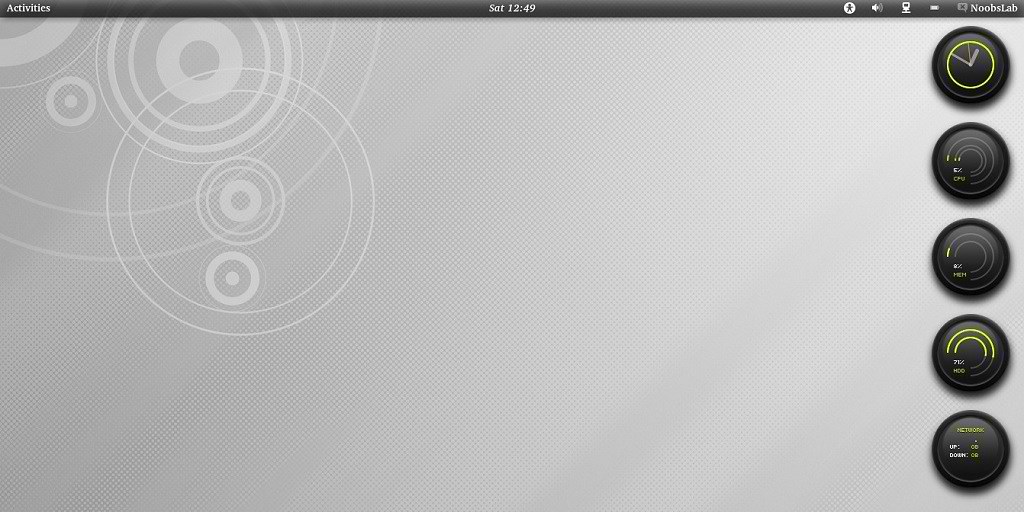
Install Conky in Ubuntu/Linux Mint open terminal (Press Ctrl+Alt+T) and copy the following commands in the Terminal:
Install by yourself in other distro's.
- sudo apt-get install conky conky-all
First of all Download Startup script with following commands:
Now open Startup Applications > click Add > New Dialog box will open click on Browse > Now (Press Ctrl+H) see following screenshot.
- wget -O .start-conky http://goo.gl/6RrEw
- chmod +x .start-conky

1st of all install fonts:
Enter following commands in terminal to install fonts:
- mkdir ~/.fonts
- wget -O fonts-conky-sample.zip http://goo.gl/JTej8
- unzip fonts-conky-sample.zip -d ~/.fonts
1: Single 1-Cpu Conky Sample

for (Unity, Gnome Classic, Mate, and other):
To install conky sample in Ubuntu/Mint open Terminal (Press Ctrl+Alt+T) and copy the following commands in the Terminal:
for (Gnome Shell and Cinnamon):
- wget -O conky-sample-1cpu.zip http://goo.gl/bJonr
- unzip conky-sample-1cpu.zip && sudo rm conky-sample-1cpu.zip
To install conky sample in Ubuntu/Mint open Terminal (Press Ctrl+Alt+T) and copy the following commands in the Terminal:
- wget -O conky-sample-1cpu-gs.zip http://goo.gl/feUGC
- unzip conky-sample-1cpu-gs.zip && sudo rm conky-sample-1cpu-gs.zip
2: Dual Core 2-Cpu Conky Sample
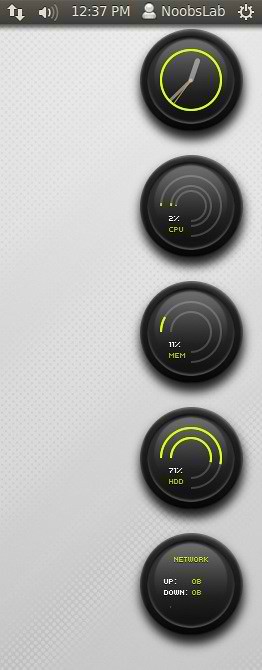
for (Unity, Gnome Classic, Mate, and other):
To install conky sample in Ubuntu/Mint open Terminal (Press Ctrl+Alt+T) and copy the following commands in the Terminal:
for (Gnome Shell and Cinnamon):
- wget -O conky-sample-2core.zip http://goo.gl/Iaauw
- unzip conky-sample-2core.zip && sudo rm conky-sample-2core.zip
To install conky sample in Ubuntu/Mint open Terminal (Press Ctrl+Alt+T) and copy the following commands in the Terminal:
- wget -O conky-sample-2core-gs.zip http://goo.gl/EumJ8
- unzip conky-sample-2core-gs.zip && sudo rm conky-sample-2core-gs.zip
3: Quad Core 4-Cpu Conky Sample
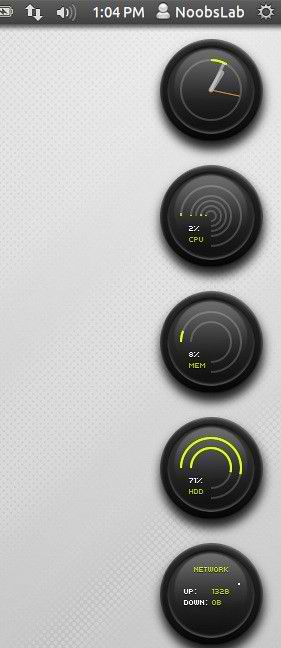
for (Unity, Gnome Classic, Mate, and other):
To install conky sample in Ubuntu/Mint open Terminal (Press Ctrl+Alt+T) and copy the following commands in the Terminal:
for (Gnome Shell and Cinnamon):
- wget -O conky-sample-4core.zip http://goo.gl/tQdH5
- unzip conky-sample-4core.zip && sudo rm conky-sample-4core.zip
To install conky sample in Ubuntu/Mint open Terminal (Press Ctrl+Alt+T) and copy the following commands in the Terminal:
That's it, Enjoy
- wget -O conky-sample-4core-gs.zip http://goo.gl/CTQft
- unzip conky-sample-4core-gs.zip && sudo rm conky-sample-4core-gs.zip
Source: conky-sample-3


