Warung Bebas
Showing posts with label ebook. Show all posts

Monday, 3 September 2012

Install Calibre 0.8.67 Library in Ubuntu/Linux Mint (New Release)

Install Calibre 0.8.67 Library in Ubuntu 12.04 Precise/Linux Mint 12

Calibre is a free and open source e-book library management application developed by users of e-books for users of e-books.
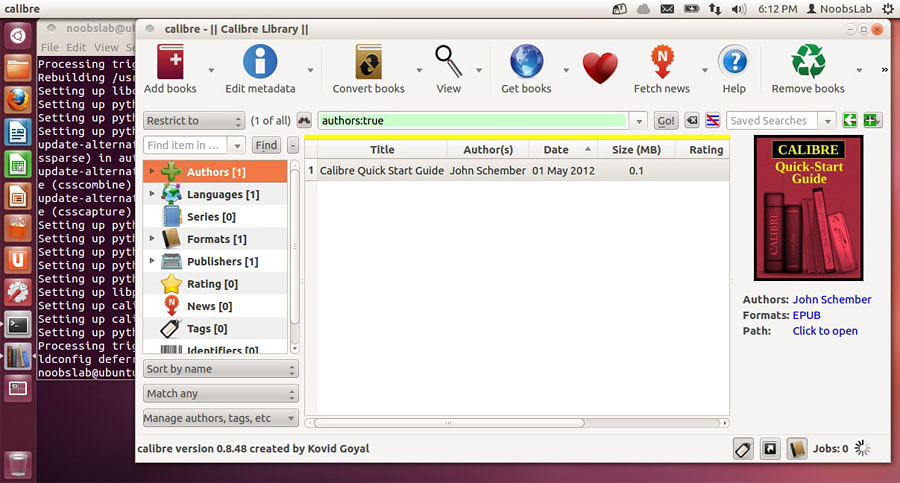
calibre

It has a cornucopia of features divided into the following main categories:
  1. Library Management
  2. E-book conversion
  3. Syncing to e-book reader devices
  4. Downloading news from the web and converting it into e-book form
  5. Comprehensive e-book viewer
  6. Content server for online access to your book collection
New Features
  • Generate a PDF Outline based on the Table of Contents of the input document
  • Add an option under Structure Detection to set the 'Start reading at' metadata with an XPath expression.
  • Speed up changing the title and author of files with books larger than 3MB by avoiding an unnecessary extra copy.
  • Wireless device driver: Make detecting and connecting to devices easier on networks where mdns is disabled
  • Allow choosing the default font family and size when generating PDF files (under PDF Options) in the conversion dialog
  • Metadata dialog: Comments editor: Allow specifying the name of a link when using the insert link button.
  • Remove the unmaintained pdfmanipulate command line utility. There are many other tools that provide similar functionality, for example, pdftk and podofo
Bug Fixes
  • Fix regression that broke sorting of non series titles before series titles
  • Do not create duplicate embedded fonts in the PDF for every individual HTML file in the input document
  • Fix regression that broke DnD of files having a # character in their names to the book details panel
  • Allow generating PDF files with more than 512 pages on windows.
  • Fix minor bug in handling of the completion popups when using the next/previous buttons in the edit metadata dialog
New Sources added:
  • Cumhuriyet Yzarlar by Sethi Eksi
  • Arcadia by Masahiro Hasegawa
  • Business Week Magazine and Chronicle of Higher Education by Rick Shang
  • CIPER Chile by Darko Miletic
  • Improved news sources
  • Coding Horror
  • TIME Magazine
For other Ubuntu distributions install from Ubuntu Software Center. It's old version is also available in Ubuntu Software Center.

To install Calibre in Ubuntu/Linux Mint open Terminal (Press Ctrl+Alt+T) and copy the following commands in the Terminal:
  • sudo add-apt-repository ppa:n-muench/calibre
  • sudo apt-get update
  • sudo apt-get install calibre
That's it, Enjoy
Source: Calibre

Tuesday, 24 July 2012

Install Calibre Library in Ubuntu/Linux Mint (New Release)

Install Calibre Library in Ubuntu 12.04 Precise/Ubuntu 11.10 Oneiric/Linux Mint

Calibre is a free and open source e-book library management application developed by users of e-books for users of e-books.

calibre

It has a cornucopia of features divided into the following main categories:
  1. Library Management
  2. E-book conversion
  3. Syncing to e-book reader devices
  4. Downloading news from the web and converting it into e-book form
  5. Comprehensive e-book viewer
  6. Content server for online access to your book collection
New Features
  • E-book viewer: Add a paged mode that splits up the text into pages, like in a paper book instead of presenting it as a single column. To activate click the button with the yellow scroll icon in the top right corner.
  • Digitally sign the calibre OS X and windows builds
  • Get Books: Add Mills and Boon UK
  • Various minor improvements to the Bulk metadata edit dialog
  • Fix various regression in the auto-complete functionality for authors/series/tags etc introduced in 0.8.60
  • Drivers for various new Android devices
  • MOBI: Add support for the new language EXTH header field in MOBI files generated by kindlegen 2.5
Bug Fixes
  • KF8 Output: Fix calibre produced KF8 files not showing the 'Use publisher font' option on the Kindle Touch when they have embedded fonts
  • Txt/fb2/rtf/pml/rb output: Fix non-visibile element's tail text (which should be visible) is being ignored when it shouldn't.
  • Book details panel: When displaying a link to amazon, use a country specific name like amazon.fr instead of using amazon.com for all countries
  • Conversion: When splitting on page breaks, ignore page-breaks with values of auto and inherit.
  • Metadata jacket: Specify foreground in addition to the background color for the title banner so that it remain readable if the user tries to monkey with the CSS in the viewer.
  • PDF Output: Fix rendering of cover as first age of PDF (ignore margins so that the image covers the entire page)
  • Linux binaries: Bundle libglib to avoid incompatibilities with glib on various distros.
  • Fix find_identical_books() choking on books with too many authors

It's old version is also available in Ubuntu Software Center.

To install Calibre on Ubuntu/Linux Mint open Terminal (Press Ctrl+Alt+T) and copy the following commands in the Terminal:
  • sudo add-apt-repository ppa:n-muench/calibre
  • sudo apt-get update
  • sudo apt-get install calibre
That's it, Enjoy
Source: Calibre
 

Just the Life of Eddie Copyright © 2012 Best Celebrity Wallpaper -- Powered by Blogger