Warung Bebas
Showing posts with label gadget. Show all posts

Wednesday, 23 January 2013

Install Ubuntu Phone Clock in 0.5 Ubuntu 12.10/12.04/Linux Mint 14/13

Install Ubuntu Phone Clock in 0.5 Ubuntu 12.10 Quantal/Ubuntu 12.04 Precise/Linux Mint 14/13

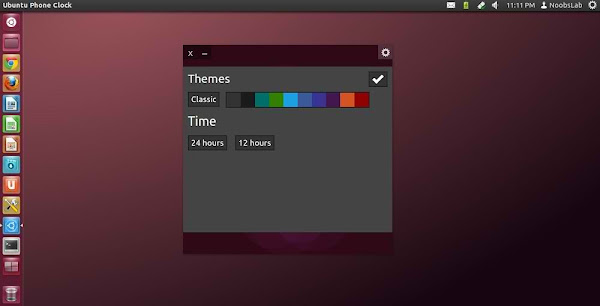
Ubuntu OS is getting popular day by day and almost all Linux users(Power-User) is waiting for Ubuntu OS to run on their phones. Ubuntu Phone OS has really nice clock on screen which changes color and animation on phone OS. So now Gabriel Barbosa Nascimento made this clock for Ubuntu desktop OS. It looks really fancy & cool and it has classic feature to animate clock and change color after sometime automatically. Also there are clock colors available to choose which is relevant to your wallpaper/theme. It is possible to drag this widget anywhere on your desktop. This has been tested in Ubuntu 12.10/12.04, If you want to try on other Ubuntu or Ubuntu based versions then Go ahead.
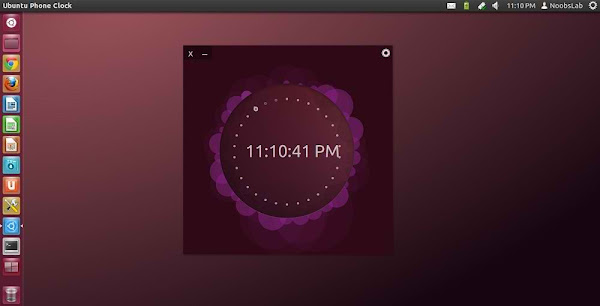
ubuntu phone clock

ubuntu os clock

ubuntu clock

To install in Ubuntu 12.10/Linux Mint 14 open Terminal (Press Ctrl+Alt+T) and copy the following commands in the Terminal:
  • sudo add-apt-repository ppa:barbosanascimentogabriel/ubuntu-phone-clock
  • sudo apt-get update
  • sudo apt-get install ubuntu-phone-clock
To install in Ubuntu 12.04/Linux Mint 13/Other Ubuntu versions open Terminal (Press Ctrl+Alt+T) and copy the following commands in the Terminal:
  • wget -O ubuntu-phone-clock.deb http://goo.gl/6b5Cs
  • sudo dpkg -i ubuntu-phone-clock.deb && rm ubuntu-phone-clock.deb
That's it

Saturday, 10 November 2012

Install Techno-Conky in Ubuntu 12.10/12.04/Any Ubuntu Version/Linux Mint/Fedora/Others

Install Techno-Conky in Ubuntu 12.10/12.04/Any Ubuntu Version/Linux Mint/Fedora/Others Distributions (Unity + Gnome Shell + Other Environments)

Conky is free widget for Linux, It can display any information which you want to show on your desktop. Techno Conky covers all desktop to display information on your desktop. It looks beautiful on dark backgrounds. NoobsLab did some modifications in this conky and made available for you. Techno-conky display System info(CPU, Ram, System up-time  Disk usage with graph, Kernel version), Network info(Up and Down Speed, Network signals, ip address), Time and Date with day + year. You can check other conky widgets collection for linux desktop to make desktop nice.

Install Conky in Ubuntu/Linux Mint open terminal (Press Ctrl+Alt+T) and copy the following commands in the Terminal:
  • sudo apt-get install conky conky-all
Install by yourself in other distro's.

First of all Download Startup script with following commands:
  • wget -O .start-conky http://goo.gl/H8K9L
  • chmod +x .start-conky
Now open Startup Applications > click Add  > New Dialog box will open click on Browse > Go to your Home directory then Press (Ctrl+H - to show hidden files) see following screenshot.
conky startup

Note: First install start-up script because this conky has different start-up script. After conky installation log-out and log in back.

HD Video for you

1: Techno-Conky Black for Unity, Gnome Classic, Mate, and Others
conky

To install Techno-Conky in Ubuntu/Mint open Terminal (Press Ctrl+Alt+T) and copy the following commands in the Terminal:
  • wget -O techno-conky-u.zip http://goo.gl/TmoNT
  • unzip techno-conky-u.zip
  • sudo rm techno-conky-u.zip

2: Techno-Conky Black for Gnome Shell, Cinnamon
techno conky

To install Techno-Conky in Ubuntu/Mint open Terminal (Press Ctrl+Alt+T) and copy the following commands in the Terminal:
  • wget -O techno-conky-gs.zip http://goo.gl/ZppNe
  • unzip techno-conky-gs.zip
  • sudo rm techno-conky-gs.zip
That's it, Enjoy
Source: Techno-Conky

Wednesday, 5 September 2012

Install Energreen Conky in Ubuntu/Linux Mint/Fedora/Others

Install Energreen Conky in Ubuntu 12.10/Ubuntu 12.04/11.10/11.04/Any Ubuntu Verion/Any Linux Mint/Fedora/Others

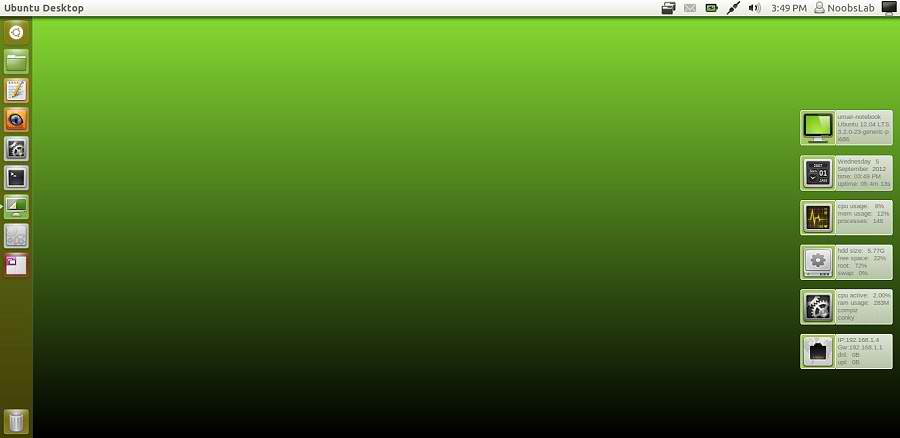
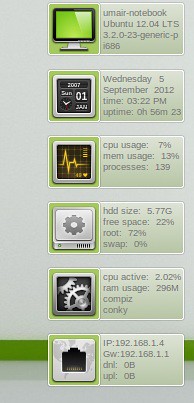
Previously NoobsLab shared other Conky widgets for linux desktop to make desktop nice. So today brings Energreen conky for you, Basically this conky is available for some environments but NoobsLab provides after modification for all Linux desktops like (Gnome Shell, Unity, Cinnamon, Gnome Classic, Mate, and others) and for Ethernet and Wifi. EnerGreen conky shows OS version with Kernel, CPU usage, Memory usage, HDD usage, User Login info, Current Processes, CPU up-time, and Current PC Time + Date.
conky green

conky green

Install Conky in Ubuntu/Linux Mint open terminal (Press Ctrl+Alt+T) and copy the following commands in the Terminal:
  • sudo apt-get install conky conky-all
Install by yourself in other distro's.

First of all Download Startup script with following commands:
  • wget -O .start-conky http://goo.gl/6RrEw
  • chmod +x .start-conky
Now open Startup Applications > click Add  > New Dialog box will open click on Browse > Now (Press Ctrl+H) see following screenshot.
conky startup


1: Energreen Conky for (Unity, Gnome Classic, Mate, and Others)
conky
>> For Ethernet

To install Energreen-Conky in Ubuntu/Mint open Terminal (Press Ctrl+Alt+T) and copy the following commands in the Terminal:
  • wget -O energreen-conky-eth-u.zip http://goo.gl/dVLWl
  • unzip energreen-conky-eth-u.zip
  • sudo rm energreen-conky-eth-u.zip
>> For Wifi

To install Energreen-Conky in Ubuntu/Mint open Terminal (Press Ctrl+Alt+T) and copy the following commands in the Terminal:
  • wget -O energreen-conky-wlan-u.zip http://goo.gl/IUu0B
  • unzip energreen-conky-wlan-u.zip
  • sudo rm energreen-conky-wlan-u.zip

2: Energreen Conky for (Gnome Shell, Cinnamon)
conky green
>> For Ethernet

To install Energreen-Conky in Ubuntu/Mint open Terminal (Press Ctrl+Alt+T) and copy the following commands in the Terminal:
  • wget -O energreen-conky-eth-gs.zip http://goo.gl/5HVfs
  • unzip energreen-conky-eth-gs.zip
  • sudo rm energreen-conky-eth-gs.zip
>> For Wifi

To install Energreen-Conky in Ubuntu/Mint open Terminal (Press Ctrl+Alt+T) and copy the following commands in the Terminal:
  • wget -O energreen-conky-wlan-gs.zip http://goo.gl/HICai
  • unzip energreen-conky-wlan-gs.zip
  • sudo rm energreen-conky-wlan-gs.zip
That's it, Enjoy
Source: Energreen
 

Just the Life of Eddie Copyright © 2012 Best Celebrity Wallpaper -- Powered by Blogger