 0
comments
0
comments
Install Recent Notification Indicator on Ubuntu 12.04/11.10 Oneiric/11.04 Natty/Linux Mint
The Recent Notifications applet displays the recent NotifyOSD notifications and allows you copy the text or a link from a notification. You can also click on a link to open it. There are options to blacklist applications within the applet to hide the associated notifications and set the time limit to show a message.

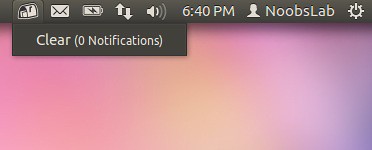
To Install Recent Notification on Ubuntu 12.04/11.10/11.04 open Terminal (Press Ctrl+Alt+T) and copy the following commands in the Terminal:
Logout and Login back. Enjoy
The Recent Notifications applet displays the recent NotifyOSD notifications and allows you copy the text or a link from a notification. You can also click on a link to open it. There are options to blacklist applications within the applet to hide the associated notifications and set the time limit to show a message.
To Install Recent Notification on Ubuntu 12.04/11.10/11.04 open Terminal (Press Ctrl+Alt+T) and copy the following commands in the Terminal:
To Install Recent Notification on Linux Mint open Terminal and copy the following commands in the Terminal:
- sudo add-apt-repository ppa:jconti/recent-notifications
- sudo apt-get update
- sudo apt-get install indicator-notifications
Note: This is not checked on Mint 12 but you can try.
- sudo add-apt-repository ppa:jconti/recent-notification
- sudo apt-get update
- sudo apt-get install recent-notifications
Logout and Login back. Enjoy
Source: LaunchPad


