 0
comments
0
comments
Install Blue Wave GTK3 three themes on Ubuntu 12.04 Precise Pangolin/ Ubuntu 11.10 Oneiric/Linux Mint

Author Created this theme using Ubuntu's Ambiance GTK2/GTK3 as a building block.
The purpose of this theme was to make something that was easy to read, integrated well in both gnome-shell and ubuntu unity desktop, and looks seamless between gtk2 and gtk3 (still working on that).
Also included is a gnome-shell theme, but it is far off from completion and probably shouldn't be used on a production desktop.
Changes for Version 1.4 Blue Wave:
To install theme on Ubuntu/Linux Mint open Terminal (Press Ctrl+Alt+T) and copy the following commands in the Terminal:
- 1st Wave Blue Theme:
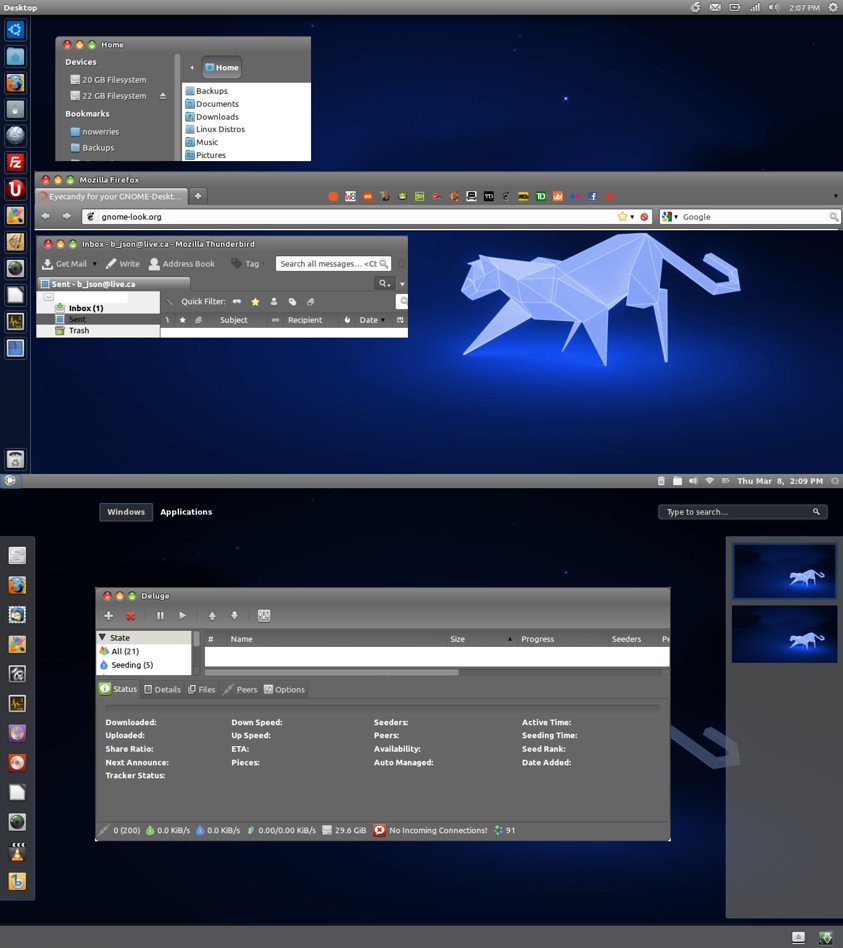
Author Created this theme using Ubuntu's Ambiance GTK2/GTK3 as a building block.
The purpose of this theme was to make something that was easy to read, integrated well in both gnome-shell and ubuntu unity desktop, and looks seamless between gtk2 and gtk3 (still working on that).
Also included is a gnome-shell theme, but it is far off from completion and probably shouldn't be used on a production desktop.
Changes for Version 1.4 Blue Wave:
- Changed GTK3 default and toolbar buttons to give them the effect of pressing them in when active.
- Fixed the treeview column colors. (now there are none just white to match canvas)
- Added light borders to notebook frames, tabs, fixed column headers.
- Few other minor tweaks.
- Gnome Shell Changes
- Changed a lot of stuff to make the theme fit with overall appearance of the GTK+ themes.
To install theme on Ubuntu/Linux Mint open Terminal (Press Ctrl+Alt+T) and copy the following commands in the Terminal:
- 1st Wave Blue Theme:
- 2nd Wave Blue Ambiant Theme:
- mkdir ~/.themes
- wget http://dl.dropbox.com/u/53319850/NoobsLab.com/wave_blue.zip
- unzip wave_blue.zip -d ~/.themes
- 3rd Wave Dark Black Theme:
- mkdir ~/.themes
- wget http://dl.dropbox.com/u/53319850/NoobsLab.com/wave_blue_ambiant.zip
- unzip wave_blue_ambiant.zip -d ~/.themes
To change theme install Gnome Tweak Tool. Enjoy
- mkdir ~/.themes
- wget http://dl.dropbox.com/u/53319850/NoobsLab.com/wave_dark_black.zip
- unzip wave_dark_black.zip -d ~/.themes
Source: Blue Wave


