0
comments
0
comments
Install Conky-Two in Ubuntu 12.10/Ubuntu 12.04/Ubuntu 11.10/any Ubuntu Version/Linux Mint/Fedora/Any Linux Distro
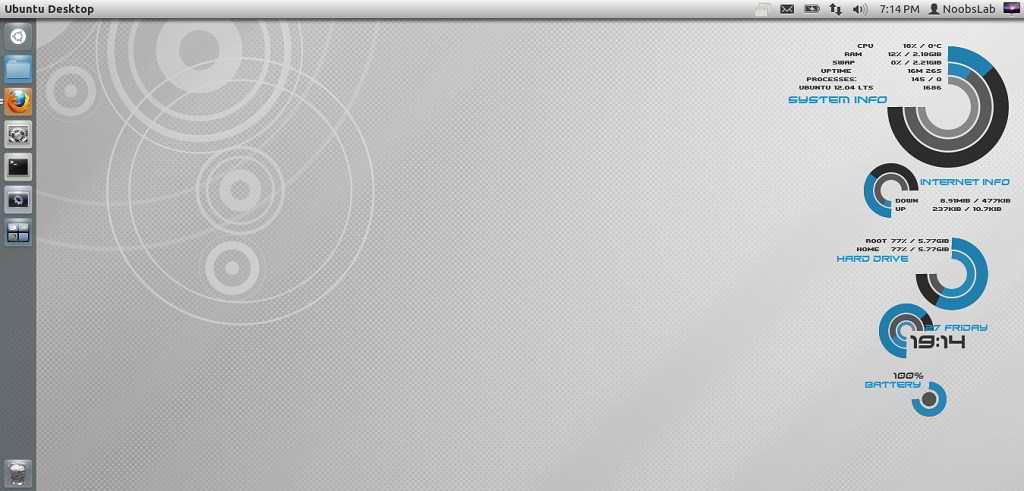
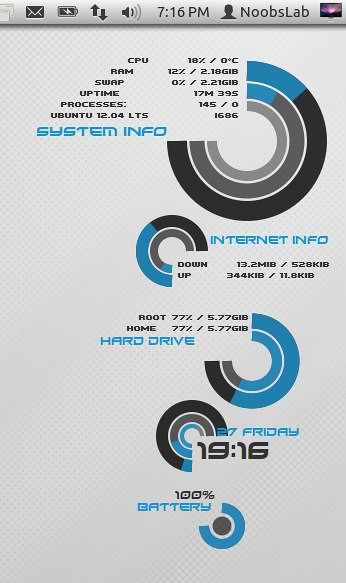
NoobsLab have Conky Collection for Linux Distro's. This Conky-Two is really beautiful desktop gadget, NoobsLab modified this gadget and make this available for wifi and ethernet. It support all Linux environments (Gnome Shell, Unity, Cinnamon, Gnome Classic, Mate, and others). It shows System Info (Cpu, Ram, Swap, System Uptime, Processes, Linux Version), Hard Drive Usage (Root, Home), Network (Count Received/Sent data, Shows current up/down speed), Time, Day, Date, Laptop Battery.

Install Conky in Ubuntu/Linux Mint open terminal (Press Ctrl+Alt+T) and copy the following commands in the Terminal:
First of all Download Startup script with following commands:

1: Conky-Two for Wifi

for (Unity, Gnome Classic, Mate, and other):
To install Conky-Two in Ubuntu/Mint open Terminal (Press Ctrl+Alt+T) and copy the following commands in the Terminal:
To install Conky-Two in Ubuntu/Mint open Terminal (Press Ctrl+Alt+T) and copy the following commands in the Terminal:
2: Conky-Two for Ethernet
for (Unity, Gnome Classic, Mate, and other):
To install Conky-Two in Ubuntu/Mint open Terminal (Press Ctrl+Alt+T) and copy the following commands in the Terminal:
To install Conky-Two in Ubuntu/Mint open Terminal (Press Ctrl+Alt+T) and copy the following commands in the Terminal:
NoobsLab have Conky Collection for Linux Distro's. This Conky-Two is really beautiful desktop gadget, NoobsLab modified this gadget and make this available for wifi and ethernet. It support all Linux environments (Gnome Shell, Unity, Cinnamon, Gnome Classic, Mate, and others). It shows System Info (Cpu, Ram, Swap, System Uptime, Processes, Linux Version), Hard Drive Usage (Root, Home), Network (Count Received/Sent data, Shows current up/down speed), Time, Day, Date, Laptop Battery.
Install Conky in Ubuntu/Linux Mint open terminal (Press Ctrl+Alt+T) and copy the following commands in the Terminal:
Install by yourself in other distro's.
- sudo apt-get install conky conky-all
First of all Download Startup script with following commands:
Now open Startup Applications > click Add > New Dialog box will open click on Browse > Now (Press Ctrl+H) see following screenshot.
- wget -O .start-conky http://goo.gl/6RrEw
- chmod +x .start-conky

1: Conky-Two for Wifi
for (Unity, Gnome Classic, Mate, and other):
To install Conky-Two in Ubuntu/Mint open Terminal (Press Ctrl+Alt+T) and copy the following commands in the Terminal:
for (Gnome Shell and Cinnamon):
- wget -O conky-two-wlan-u.zip http://goo.gl/Ov6b1
- unzip conky-two-wlan-u.zip
- sudo rm conky-two-wlan-u.zip
To install Conky-Two in Ubuntu/Mint open Terminal (Press Ctrl+Alt+T) and copy the following commands in the Terminal:
- wget -O conky-two-wlan-gs.zip http://goo.gl/4F9Qq
- unzip conky-two-wlan-gs.zip
- sudo rm conky-two-wlan-gs.zip
2: Conky-Two for Ethernet
for (Unity, Gnome Classic, Mate, and other):
To install Conky-Two in Ubuntu/Mint open Terminal (Press Ctrl+Alt+T) and copy the following commands in the Terminal:
for (Gnome Shell and Cinnamon):
- wget -O conky-two-eth-u.zip http://goo.gl/vquIX
- unzip conky-two-eth-u.zip
- sudo rm conky-two-eth-u.zip
To install Conky-Two in Ubuntu/Mint open Terminal (Press Ctrl+Alt+T) and copy the following commands in the Terminal:
That's it, Enjoy
- wget -O conky-two-eth-gs.zip http://goo.gl/uwlTu
- unzip conky-two-eth-gs.zip
- sudo rm conky-two-eth-gs.zip
Source: Conky Two