Warung Bebas
Showing posts with label indicator. Show all posts

Sunday, 13 January 2013

Install My-Weather indicator in Ubuntu 12.10/12.04/13.04/Linux Mint

Install My-Weather indicator in Ubuntu 12.10 Quantal/Ubuntu 12.04 Precise/13.04/11.10/11.04/10.10/10.04/Linux Mint 14/13/12/10/9

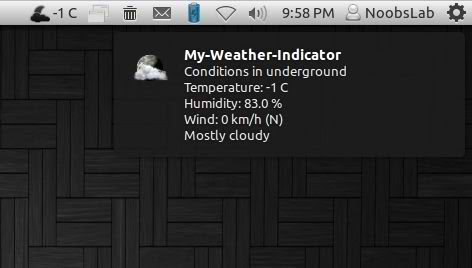
It displays weather of location on panel, You can add up-to 2 locations in this indicator. It shows weather in complete details. There is forecast map option to choose location from map.

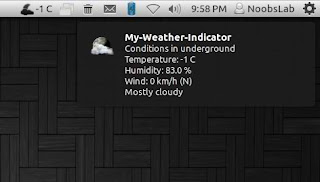
weather indicator

You can add up to two locations in this indicator, there are option for show temperature on panel and show notifications about weather. Also you can select "Auto location" for Main location, It will auto detect your current location.
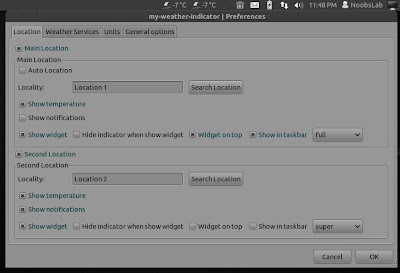
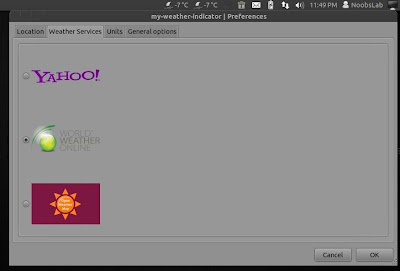
There are three weather sources available: Yahoo, Open Weather Map and World Weather Online. You can choose whatever you want.
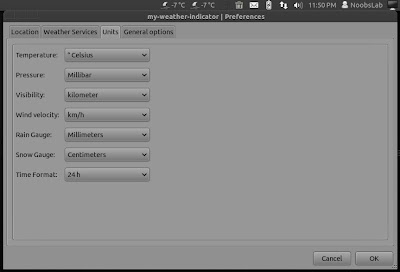
You change settings of temperature and details for weather.
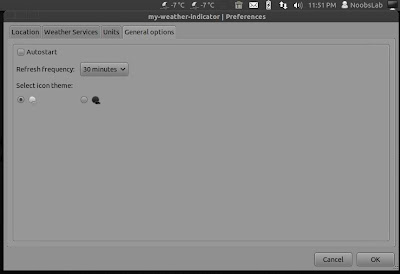
In General Options you can select "Auto-start" option to start automatically at login. You can change weather refresh time from "Refresh Frequency" and You can choose light or dark icon for panel.
To install My-Weather indicator in Ubuntu/Linux Mint open Terminal (Press Ctrl+Alt+T) and copy the following commands in the Terminal:
  • sudo add-apt-repository ppa:atareao/atareao
  • sudo apt-get update
  • sudo apt-get install my-weather-indicator
That's it, Enjoy
Source: atareao

Thursday, 20 December 2012

Install My-Weather indicator in Ubuntu/Linux Mint

Install My-Weather indicator in Ubuntu 12.10 Quantal/Ubuntu 12.04 Precise/11.10/11.04/10.10/10.04/Linux Mint 14/13/12/10/9

It displays weather of location on panel, You can add up-to 2 locations in this indicator. It shows weather in complete details. There is forecast map option to choose location from map.
weather indicator

weather indicator

weather indicator

You can add up to two locations in this indicator, there are option for show temperature on panel and show notifications about weather. Also you can select "Auto location" for Main location, It will auto detect your current location.
weather indicator
There are three weather sources available: Yahoo, Open Weather Map and World Weather Online. You can choose whatever you want.
weather indicator
You change settings of temperature and details for weather.
weather indicator
In General Options you can select "Auto-start" option to start automatically at login. You can change weather refresh time from "Refresh Frequency" and You can choose light or dark icon for panel.
weather indicator

To install My-Weather indicator in Ubuntu/Linux Mint open Terminal (Press Ctrl+Alt+T) and copy the following commands in the Terminal:
  • sudo add-apt-repository ppa:noobslab/indicators
  • sudo apt-get update
  • sudo apt-get install my-weather-indicator
That's it, Enjoy

Sunday, 2 December 2012

Install Window-List Indicator in Ubuntu 12.10/12.04/11.10/11.04/Linux Mint 14/13/12/11

Install Window-List Indicator in Ubuntu 12.10 Quantal/Ubuntu 12.04 Precise/Ubuntu 11.10 Oneiric/Ubuntu 11.04/Linux Mint 14/13/12/11

Window-list is an application indicator to display a list of all current open windows via indicator. Each window can be activated by selecting from the list.
window list

To install Window-List indicator in Ubuntu/Linux Mint open Terminal (Press Ctrl+Alt+T) and copy the following commands in the Terminal:
  • sudo add-apt-repository ppa:jwigley/window-list
  • sudo apt-get update
  • sudo apt-get install window-list
That's it, enjoy

Tuesday, 17 April 2012

Install Ubuntu One Indicator in Ubuntu 12.04 Precise Pangolin

Install Ubuntu One Indicator in Ubuntu 12.04 Precise Pangolin

ubuntu one

This Ubuntu One Indicator display Ubuntu One account synchronization on Unity panel.

Features of Ubuntu One Indicator:
  • Shows when sync-daemon is offline, idle, synchronizing or having some error condition. This is reflected by the icons in the indicator.
  • Shows current state name, metadata queue length and content queue lenght.
  • Attempts to calculate ETA for metadata queue.
  • Shows current quota usage. Has a disconnect/connect menu entry that asks syncdaemon to perform these actions.
  • Upon receiving the notification about a published file it will add the entry to �Recently Published Files� menu.
  • Clicking on the menu entry will copy the public URL to the clipboard.
What's new in this Release:
  • 1.0.3 is mostly a bugfix release.
  • The code was completely rewritten in Vala.
  • Properly format estimation time.
  • Order the Recently Published Files list by mtime.
  • Use ubuntuone-client icons if icon-theme is not ubuntu-mono.
  • Remove old ubuntuone-indicator.desktop file.
  • Refresh quota after uploads, downloads and unlinks.
  • Automatically restart after upgrade.
  • Indicator will always be started if installed.

To Install Ubuntu One indicator on Ubuntu 12.04 (Press Ctrl+Alt+T) and copy the following commands in the Terminal:
  • sudo add-apt-repository ppa:rye/ubuntuone-extras
  • sudo apt-get update
  • sudo apt-get install indicator-ubuntuone
Enjoy
Source: Launchpad

Install Recent Notification Indicator on Ubuntu/Linux Mint

Install Recent Notification Indicator on Ubuntu 12.04/11.10 Oneiric/11.04 Natty/Linux Mint

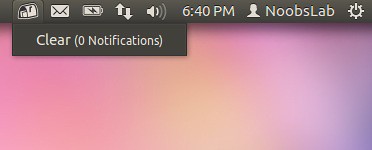
The Recent Notifications applet displays the recent NotifyOSD notifications and allows you copy the text or a link from a notification. You can also click on a link to open it. There are options to blacklist applications within the applet to hide the associated notifications and set the time limit to show a message.

notification indicator

Ubuntu recent notification indicator

To Install Recent Notification on Ubuntu 12.04/11.10/11.04 open Terminal (Press Ctrl+Alt+T) and copy the following commands in the Terminal:
  • sudo add-apt-repository ppa:jconti/recent-notifications
  • sudo apt-get update
  • sudo apt-get install indicator-notifications
To Install Recent Notification on Linux Mint open Terminal and copy the following commands in the Terminal:
  • sudo add-apt-repository ppa:jconti/recent-notification
  • sudo apt-get update
  • sudo apt-get install recent-notifications
Note: This is not checked on Mint 12 but you can try.
Logout and Login back. Enjoy
Source: LaunchPad
 

Just the Life of Eddie Copyright © 2012 Best Celebrity Wallpaper -- Powered by Blogger