New Release Install Awoken Icons 2.4 on Ubuntu 12.04 Precise Pangolin/Ubuntu 11.10 Oneiric/Ubuntu 11.04/Linux Mint 12/Linux Mint 13Awoken Icons are very famous icons for Linux Distro's, It is most rated icons I have ever seen in Linux distro's. These icons are now available for Ubuntu 12.04 support and other latest & Linux flavors.
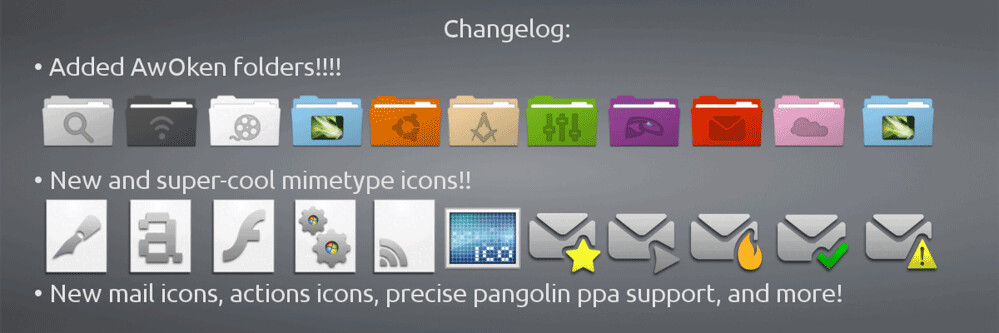
Changelog for 2.4 Version:- Added AWOKEN folders! Now the set is integrated with the most cool and stylish folders ever!
- Drastic revision of mimetypes: now they use a different template icon (modified from Elementary icon set), and they're more refined in 24x24 version!
- Most of the 22x22 actions icons that have characterized the latest versions have been brought to 24x24px and 128x128px resolutions. So the iconset become cleaner, cooler and more integrated! Consequently, also some status icons are changed.
- Mail icons redrawed (both in bigger and in lower resolution). Now your favourite email client's toolbar (except thunderbird) works like a charm!
- Added ppa for precise.
- Drastic revision of the colorization script: now is faster, cleaner and supports parallel processing. This lead to a serious improvement on latest multi-core machines, but also on elder computers. Another big improvement is related to the fact that is now accepting RGB colors instead of CMY colors!
- Revision of the Installation and Instructions PDF file.
- Removed gedit choice from the customization script (it's useless having the possibility to change only one icon!).
- Removed some folder sub-types, since the iconset is became too big. They are classy-yellow, classy-carboard, classy-white, classy-black. For the same reason, removed (from other folder types) folder-joomla, folder-wip, folder-science2, folder-windows, folder-apple, folder-ffw, folder-byte, folder-cd, folder-fonts, folder-linux1, folder-linux2, folder-public, folder-important.
- Application added (or redrawed): accessories-text-editor-symbolic, document-open-symbolic, network-wired-disconnected, ubuntuone emblems, gtk-zoom-100 in 22x22px, jdownloader, gwibber, mail-message-new, mail-forward, mail-outbox, mail-mark-important (-junk, -notjunk, -unread, -spam), mail-reply, mail-reply-all, mail-move, edit-delete-mail, extract-archive, add-files-to-archive, add-folder-to-archive, gnome-pie, gelemental, luminance-hdr, application-x-mint, grooveshark, mintinstall, addressbook icons, call-start, call-stop, fillmore, gpick, gftp, batti, marlin, kompozer, preferences-desktop, preferences-system, preferences-desktop-personal, mime for video, midori, djvulibre, plank, fontforge, ffanvil, general settings icons, kupfer, acetoneiso, videoporama, beatbox, nvclock, cryptkeeper, bino, isomaster (I hope), gpixpod, graveman, gshutdown, ogmrip, billardgl, foobillard, fedora live usb, mp3-splt-gtk, yarock, scim-setup, application-fonts, mono-runtime, gnome-settings-default-applications, nitrogen, musique
- Application added (or redrawed) specifically for KDE version: application-x-tarz, imagewriter, script-error, code-context, edit-link, view-group, edit-select, select-rectangular, zoom-select, insert-text, select\_rectangular, run-build-install-root.
To install Awoken Icons on Ubuntu/Linux Mint open Terminal (Press Ctrl+Alt+T) and copy the following commands in the Terminal:- sudo add-apt-repository ppa:alecive/antigone
- sudo apt-get update
- sudo apt-get install awoken-icon-theme
To customize icons enter following command:
- awoken-icon-theme-customization
For Other Linux Distribution install Awoken Icons on Arch/Fedora/Suse/othersFirst Download Icons from
DevianArt link, After Download Extract your Awoken Icons three folders in (.icons) directory.
Now open Terminal and enter following commands:- cd .icons
- sudo cp -p AwOken/awoken-icon-theme-customization /usr/bin
- sudo cp -p AwOken/awoken-icon-theme-customization-clear /usr/bin
- sudo cp -p AwOkenDark/awoken-icon-theme-customization-dark /usr/bin
- sudo cp -p AwOkenWhite/awoken-icon-theme-customization-white /usr/bin
To customize icons enter following command:
- awoken-icon-theme-customization
Here is the Author Page on
DevianArt. That's it
 0
comments