Warung Bebas
Showing posts with label ubuntu video converter. Show all posts

Thursday, 19 July 2012

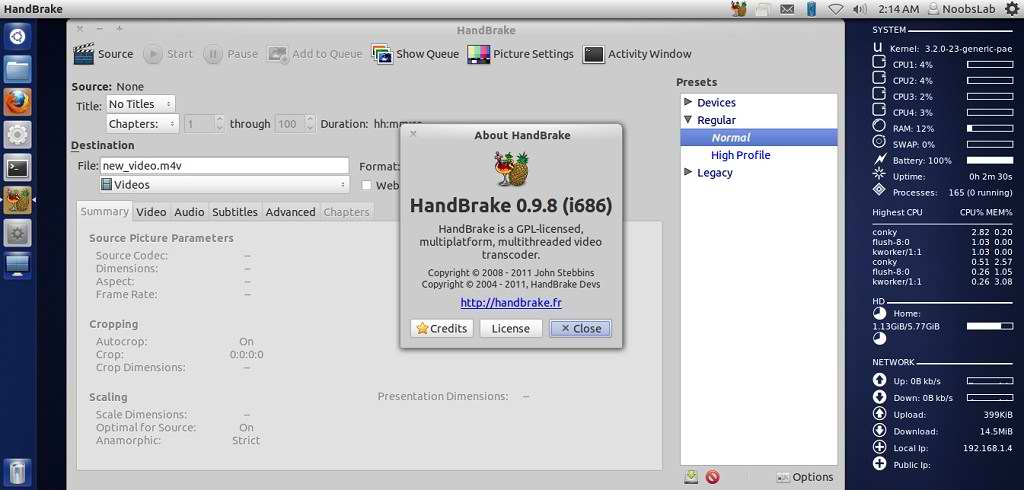
Install HandBrake 0.9.8 Video Converter in Ubuntu/Linux Mint (New Release)

Install HandBrake 0.9.8 Video Converter in Ubuntu 12.04/11.10/11.04/10.10/10.04/9.04/Linux Mint (New Release)

HandBrake is an open-source, GPL-licensed, multiplatform, multithreaded video transcoder, available for MacOS X, Linux and Windows.

ubuntu converter

Outputs Formats:
  • File format: MP4(M4V) and MKV
  • Video: H.264(x264), MPEG-4(ffmpeg), MPEG-2(ffmpeg), or Theora(libtheora)
  • Audio: AAC, CoreAudio AAC/HE-AAC (OS X Only), MP3, Flac, AC3, or Vorbis. AC-3, DTS, DTS-HD, AAC and MP3 pass-thru
Misc features:
  • Chapter selection, Chapter Markers
  • Subtitles
    • Vobsub and Closed Captions
    • SRT import and passthru
    • SSA passthru or burn-in (experimental)
  • Constant Quality or Average Bitrate Video Encoding
  • Support for VFR, CFR and VFR
  • Video and Filters: Deinterlacing, Decomb, Detelecine, Deblock, Grayscale Cropping and scaling
  • Live Video Preivew
  • Built-in presets for common devices

To install HandBrake Video Converter in Ubuntu/Linux Mint open Terminal (Press Ctrl+Alt+T) and copy the following commands in the Terminal:
  • sudo add-apt-repository ppa:stebbins/handbrake-releases
  • sudo apt-get update
  • sudo apt-get install handbrake-gtk handbrake-cli
That's it, Enjoy
Source: handbrake.fr

Monday, 12 March 2012

Install HandBrake Video Converter on Ubuntu/Linux Mint

Install HandBrake Video Converter on Ubuntu 11.10/11.04/10.10/10.04/Linux Mint

HandBrake is a GPL-licensed, multiplatform, multithreaded video transcoder.
HandBrake is not a ripper. It converts video, it does not rip it byte by byte. It does not crack the latest DVD copy protection schemes hatched by the studios.
It converts video from nearly any format to a handful of modern ones�that's it.

HandBrake is not everything for everyone for every need. When you desire a ChickenSandwich, search out a local purveyor of prepared foodstuffs. When you desire an �ber-tool for all your video encoding needs, learn how to use the command line and seek out projects like mencoder.

handbrake

Supported Sources:
Most common multimedia files that libavformat and libavcodec support.
Any DVD or Bluray-like source which is NOT copy-protected. (removal of copy protection is not supported)

Outputs:
File format: MP4(M4V) and MKV
Video: MPEG-4(ffmpeg), H.264(x264), or Theora(libtheora)
Audio: AAC, CoreAudio AAC (OS X Only), MP3, or Vorbis. AC-3 pass-through, DTS pass-thorugh (MKV only)

Misc features:
Chapter selection, Chapter Markers
Subtitles
Vobsub and Closed Captions
SRT import and passthru
SSA passthru or burn-in (experimental)
Constant Quality or Average Bitrate Video Encoding
Support for VFR, CFR and VFR
Video: Deinterlacing, Decomb, Detelecine, Cropping and scaling
Live Video Preivew

To install HandBrake video converter on Ubuntu/Linux Mint open Terminal (Press Ctrl+Alt+T) and copy the following commands in the Terminal:
  • sudo add-apt-repository ppa:stebbins/handbrake-releases
  • sudo apt-get update
  • sudo apt-get install handbrake-gtk
Here is the site of HandBrake. That's it


Just the Life of Eddie Copyright © 2012 Best Celebrity Wallpaper -- Powered by Blogger