Warung Bebas
Showing posts with label mp3 player. Show all posts

Monday, 28 May 2012

Install XNoise 0.2.2 in Ubuntu/Linux Mint (New Release)

Install Xnoise 0.2.2 lightweight Media Player for Ubuntu 12.04/11.10/11.04/10.10/Linux Mint

Xnoise, a lightweight music player with minimal interface has been updated bringing in many new features and fixes. Xnoise is written in Vala and supports video playback making it one stop media application.

xnoise

Features:
  • MPRIS v1/v2 DBus interfaces
  • Notifications
  • Window title setting
  • Video support
  • Automatic album art fetching
  • 'Now playing' pane
  • Fast library (metadata) search
  • State restore
  • ID3 tag editing
  • Lyrics fetching
  • Can play any GStreamer media
  • Plugin Support
  • Ubuntu Ayatana Soundmenu
  • Media key support
  • Lightweight and speedy
  • And more!

To Install Xnoise Media Player on Ubuntu/Linux Mint Open Terminal (Press Ctrl+Alt+T) and copy the following commands in the Terminal:
  • sudo add-apt-repository ppa:shkn/xnoise
  • sudo apt-get update
  • sudo apt-get install xnoise
For other distro's check out site of Xnoise.
Enjoy

Friday, 13 April 2012

Install Nuvola Player 1.0.5 in Ubuntu/Linux Mint

Install Nuvola Player 1.0.5 in Ubuntu 12.04 Precise via PPA
Install Nuvola Player 1.0.4 in Ubuntu 11.10 Oneiric/11.04/10.10/10.04Linux Mint via PPA

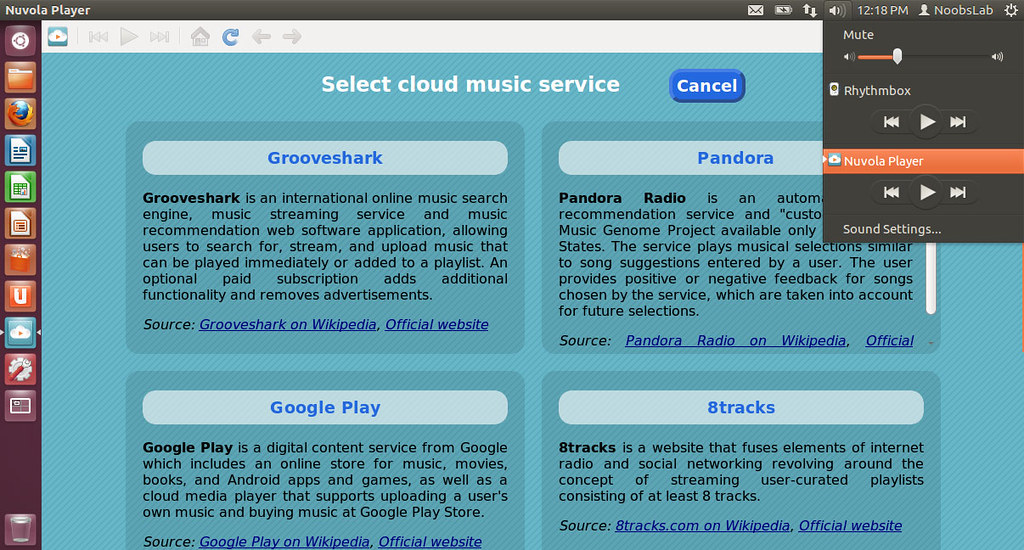
Nuvola Player runs web interface of cloud music service in its own window and provides integration with a Linux desktop (system tray, Ubuntu sound menu, dock menu and notifications). Currently supported services are Google Play, Grooveshark, Hype Machine, 8tracks and other.

nuvola

The latest stable Nuvola Player release 1.0.5 contains simple workaround that sets window size to magic values that worked during my tests. However, these values may be dependent on user settings, e.g. GTK theme, window manager, font sizes, whatever.

To install Nuvola Player on Ubuntu/Linux Mint open Terminal (Press Ctrl+Alt+T) and copy the following commands in the Terminal:
  • sudo add-apt-repository ppa:nuvola-player-builders/stable
  • sudo apt-get update
  • sudo apt-get install nuvolaplayer
Here is the site of Nuvola player.

Thursday, 5 April 2012

Install Xnoise Media Player on Ubuntu 12.04/Ubuntu 11.10/Linux Mint

Install Xnoise 0.2.0 lightweight Media Player for Ubuntu 12.04/11.10/11.04/10.10/Linux Mint

Xnoise, a lightweight music player with minimal interface has been updated bringing in many new features and fixes. Xnoise is written in Vala and supports video playback making it one stop media application.

xnoise

Features:
  • MPRIS v1/v2 DBus interfaces
  • Notifications
  • Window title setting
  • Video support
  • Automatic album art fetching
  • 'Now playing' pane
  • Fast library (metadata) search
  • State restore
  • ID3 tag editing
  • Lyrics fetching
  • Can play any GStreamer media
  • Plugin Support
  • Last.fm integration
  • Ubuntu Ayatana Soundmenu
  • Media key support
  • Lightweight and speedy
  • And more!

Changes in this Release:
  • added keybinding for increasing/decreasing playback volume
  • options to show track in file manager or trash it
  • new azlyrics plugin
  • refreshed Xnoise layout
  • merge cyclic-save-state plugin into Xnoise
  • support for dockable media sources (Categories: Playlists, Media Collection, Stores)
  • automatic thumbnail generation for videos
  • onboard dbus service (not bound to mpris)
  • redone application button for compact layout
  • added possibility to name streams on import
  • suport for tag embedded images
  • optimizations and bug fixes

To Install Xnoise Media Player on Ubuntu/Linux Mint Open Terminal (Press Ctrl+Alt+T) and copy the following commands in the Terminal:
  • sudo add-apt-repository ppa:shkn/xnoise
  • sudo apt-get update
  • sudo apt-get install xnoise
For other distro's check out site of Xnoise.
Enjoy

Friday, 23 March 2012

Install Banshee 2.4 in Ubuntu/Linux Mint

Install Banshee 2.4 on Ubuntu 12.04/11.10 Oneiric Ocelot/Ubuntu 11.04 Natty Narwhal/Linux Mint

Banshee music player

Banshee 2.4 is the culmination of six months' work by 35 developers, 38 translators and dozens of bug reporters and testers. It is a stable release, the successor to Banshee 2.0.
Play your audios and videos. Keep up with your podcasts and Internet radio. Discover new music and podcasts. Keep your portable device loaded with good stuff.

To install/upgrade open Terminal (Press Ctrl+Alt+T) and copy the following commands in the Terminal:
sudo add-apt-repository ppa:banshee-team/ppa
sudo apt-get update
sudo apt-get install banshee

or
sudo apt-get upgrade

Here is the Homepage of Banshee.
 

Just the Life of Eddie Copyright © 2012 Best Celebrity Wallpaper -- Powered by Blogger