 0
comments
0
comments
Install Nuvola Player 2.0 in Ubuntu 12.04 Precise/Ubuntu 11.10 Oneiric/Linux Mint 13/12 and Nuvola Player 1.1.0 in Ubuntu 11.04/10.04 via PPA
Nuvola Player runs a web interface of cloud music services in its own window and provides integration with a Linux desktop (multimedia keys, system tray, media player applets, dock menu, notifications and more).Nuvola Player is an open-source project licensed under GNU GPL 3 and written mainly in Vala (the core) and JavaScript (service integrations).
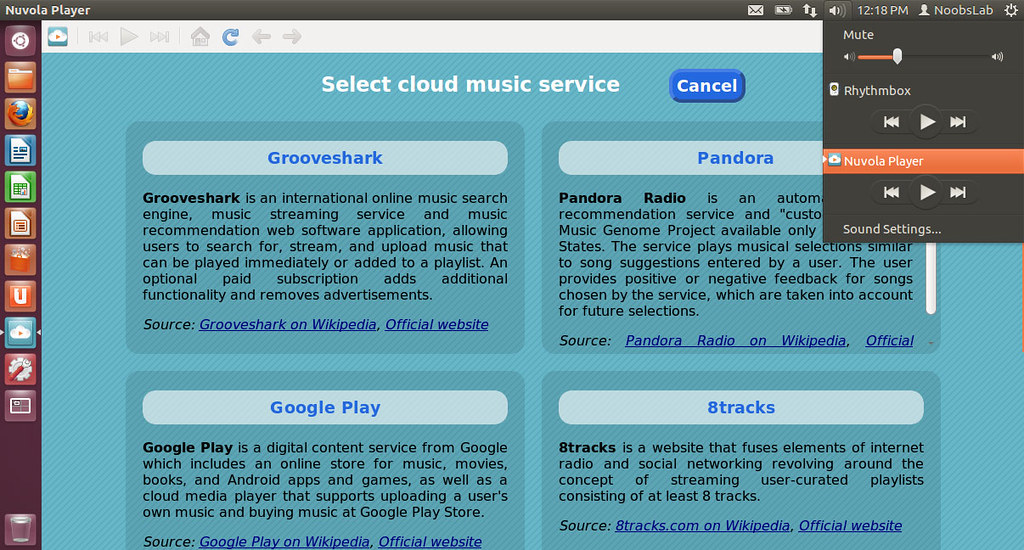
What's in this release:
To install Nuvola Player in Ubuntu/Linux Mint open Terminal (Press Ctrl+Alt+T) and copy the following commands in the Terminal:
Nuvola Player runs a web interface of cloud music services in its own window and provides integration with a Linux desktop (multimedia keys, system tray, media player applets, dock menu, notifications and more).Nuvola Player is an open-source project licensed under GNU GPL 3 and written mainly in Vala (the core) and JavaScript (service integrations).
What's in this release:
- Michael Mims created integration of Amazon Cloud Player.
- New service selector screen is based on a mock-up.
- Last.fm Scrobbling extension shows information about currently playing song to Last.fm without a need of third-party user scripts.
- Lyrics extension provides a pane with lyrics of a currently playing song.
- control Nuvola Player from terminal via command nuvolaplayer-client
- Maintainers of service integrations can use service-specific settings.
- Troubleshooting actions were moved to Preferences dialog, tab Advanced.
- Links to bug tracker, blueprints and questions were replaced by single link to support page.
- Links to Google+, Facebook and Twitter page were moved to About dialog.
- "Only toolbar" user interface mode is default and follows Elementary-like style. Other user interface modes are preserved.
- Google Play, 8tracks and Amazon Cloud Player use HTML5 audio support for playback instead of Flash plugin.
- JavaScript API 2.0
- WebKit WebView Inspector
- Introduced web plugin blocker that blocks all web plugin object not necessary for playback.
- Dynamic HTTP(S) proxy resolver is used by default. It respects proxy settings in GNOME including Proxy Auto configuration (PAC).
- Removed nuvolaplayer -Q/--quit command line argument, use nuvolaplayer-client quit instead.
- Removed support for user scripts.
- Removed support for Ubuntu 10.10 Sound Indicator (Sound Indicator in Ubuntu 11.04 and later is still supported).
- Services 8tracks, Grooveshark and Hype Machine are orphaned.
- Added Add/Remove service functionality.
To install Nuvola Player in Ubuntu/Linux Mint open Terminal (Press Ctrl+Alt+T) and copy the following commands in the Terminal:
Download Source from here for other Distributions.
- sudo add-apt-repository ppa:nuvola-player-builders/stable
- sudo apt-get update
- sudo apt-get install nuvolaplayer
Source: Nuvola player


