Warung Bebas
Showing posts with label libreoffice. Show all posts

Saturday, 6 October 2012

Install LibreOffice 3.6.2 in Ubuntu/Linux Mint (New Release)

Install LibreOffice 3.6.2 in Ubuntu 12.10/Ubuntu 12.04 Precise/11.10 Oneiric Ocelot/Any Ubuntu Version/Linux Mint
LibreOffice is the power-packed free, libre and open source personal productivity suite for Windows, Macintosh and GNU/Linux, that gives you six feature-rich applications for all your document production and data processing needs: Writer, Calc, Impress, Draw, Math and Base. Support and documentation is free from our large, dedicated community of users, contributors and developers.


New Features and Fixes:
  • Support for color scales and data bars. Import from .xlsx and import/export from/to .ods in ODF 1.2 (extended). Warning: Some limitations still apply which will be fixed in 3.7.0
  • Added Word Count to status bar.
  • PDF Export with Watermark option.
  • 10 new Impress master pages
  • Support for importing Office SmartArt
  • Import Filter for Corel Draw documents
Writer Changes:
  • Format paintbrush can now differentiate character
  • Support for contextual spacing.
  • VML import now handles lines, rotations and flips.
  • DOCX import now handles GetExpression and SetExpression fields.
  • RTF/DOCX import/export handles document zoom settings.
  • Pressing "Ctrl+[" will decrease or "Ctrl+]" will increase the font size of the selected text, respectively.
  • Updates to Word Count.
  • Table AutoFormats now record the following table-level properties.
  • Shows Text Boundaries depending on the choice to display unprintable characters.
  • Support for importing Office SmartArt.
Calc Changes:
  • New option to specify a custom sheet name prefix in new documents.
  • Merge cells option added to right-click menu.
  • Sheets can now be hidden and/or shown by using the sheets tab context menu.
  • Improved error message for invalid sheet name.
  • Export conditional formatting to .xlsx
  • Improved CSV file import.
  • Added a "Save cell formulas instead of calculated values" option to CSV export.
  • Added support for field items in cells.
  • Calc now allows sorting of data from the autofilter menu.
  • Calc now supports allowing pasting only text, value, or formula from the context menu.
  • The limitation of 3 sort entries has been removed.
  • Default number of sheets for new spreadsheets has been changed to 1.
  • New dialogs for conditional formats to support color scales and data bars.
More features info here

To Install LibreOffice on Ubuntu/Linux Mint open Terminal (Press Ctrl+Alt+T) and copy the following commands in the Terminal:
  • sudo add-apt-repository ppa:libreoffice/ppa
  • sudo apt-get update
  • sudo apt-get install libreoffice libreoffice-gnome
Download Libreoffice for other Distro's
Enjoy

Monday, 10 September 2012

Install LibreOffice 3.6.1 in Ubuntu 12.04/Ubuntu 11.10/Linux Mint

Install LibreOffice 3.6.1 in Ubuntu 12.04 Precise/11.10 Oneiric Ocelot/Any Ubuntu Version/Linux Mint
LibreOffice is the power-packed free, libre and open source personal productivity suite for Windows, Macintosh and GNU/Linux, that gives you six feature-rich applications for all your document production and data processing needs: Writer, Calc, Impress, Draw, Math and Base. Support and documentation is free from our large, dedicated community of users, contributors and developers.


New Features and Fixes:
  • Support for color scales and data bars. Import from .xlsx and import/export from/to .ods in ODF 1.2 (extended).
  • Added Word Count to status bar.
  • PDF Export with Watermark option.
  • 10 new Impress master pages
  • Support for importing Office SmartArt
  • Import Filter for Corel Draw documents
Writer Changes:
  • Support for contextual spacing.
  • Format paintbrush can now differentiate character automatic formating applied to paragraphs from those applied to text portion inside the paragraph.
  • VML import now handles lines, rotations and flips.
  • DOCX import now handles GetExpression and SetExpression fields.
  • RTF/DOCX import/export handles document zoom settings.
  • Pressing "Ctrl+[" will decrease or "Ctrl+]" will increase the font size of the selected text, respectively.
  • Updates to Word Count.
  • Table AutoFormats now record the following table-level properties.
  • Shows Text Boundaries depending on the choice to display unprintable characters.
  • Support for importing Office SmartArt.
Calc Changes:
  • "Ctrl+D" fills down in more familiar ways, filling with contents of the cell above if no cell is selected, and, filling down multiple cells with larger selections.
  • New option to specify a custom sheet name prefix in new documents.
  • Merge cells option added to right-click menu.
  • Sheets can now be hidden and/or shown by using the sheets tab context menu.
  • Improved error message for invalid sheet name.
  • Export conditional formatting to .xlsx
  • Improved CSV file import.
  • Added a "Save cell formulas instead of calculated values" option to CSV export.
  • Added support for field items in cells.
More features info here

To Install LibreOffice on Ubuntu/Linux Mint open Terminal (Press Ctrl+Alt+T) and copy the following commands in the Terminal:
  • sudo add-apt-repository ppa:libreoffice/ppa
  • sudo apt-get update
  • sudo apt-get install libreoffice libreoffice-gnome
Download Libreoffice for other Distro's
Enjoy

Thursday, 9 August 2012

Install LibreOffice 3.6 in Ubuntu/Linux Mint (New Release)

Install LibreOffice 3.6 in Ubuntu 12.04 Precise/11.10 Oneiric Ocelot/Any Ubuntu Version/Linux Mint
LibreOffice is the power-packed free, libre and open source personal productivity suite for Windows, Macintosh and GNU/Linux, that gives you six feature-rich applications for all your document production and data processing needs: Writer, Calc, Impress, Draw, Math and Base. Support and documentation is free from our large, dedicated community of users, contributors and developers.


New Features and Fixes:
  • Support for color scales and data bars. Import from .xlsx and import/export from/to .ods in ODF 1.2 (extended).
  • Added Word Count to status bar.
  • PDF Export with Watermark option.
  • 10 new Impress master pages
  • Support for importing Office SmartArt
  • Import Filter for Corel Draw documents
Writer Changes:
  • Support for contextual spacing.
  • Format paintbrush can now differentiate character automatic formating applied to paragraphs from those applied to text portion inside the paragraph.
  • VML import now handles lines, rotations and flips.
  • DOCX import now handles GetExpression and SetExpression fields.
  • RTF/DOCX import/export handles document zoom settings.
  • Pressing "Ctrl+[" will decrease or "Ctrl+]" will increase the font size of the selected text, respectively.
  • Updates to Word Count.
  • Table AutoFormats now record the following table-level properties.
  • Shows Text Boundaries depending on the choice to display unprintable characters.
  • Support for importing Office SmartArt.
Calc Changes:
  • "Ctrl+D" fills down in more familiar ways, filling with contents of the cell above if no cell is selected, and, filling down multiple cells with larger selections.
  • New option to specify a custom sheet name prefix in new documents.
  • Merge cells option added to right-click menu.
  • Sheets can now be hidden and/or shown by using the sheets tab context menu.
  • Improved error message for invalid sheet name.
  • Export conditional formatting to .xlsx
  • Improved CSV file import.
  • Added a "Save cell formulas instead of calculated values" option to CSV export.
  • Added support for field items in cells.
More features info here

To Install LibreOffice on Ubuntu/Linux Mint open Terminal (Press Ctrl+Alt+T) and copy the following commands in the Terminal:
  • sudo add-apt-repository ppa:libreoffice/libreoffice-prereleases
  • sudo apt-get update
  • sudo apt-get install libreoffice
Download Libreoffice for other Distro's
Enjoy

Friday, 4 May 2012

Some More Tweaks for Ubuntu 12.04 Precise Pangolin

Previous Shared Important Tweaks to do after install of Ubuntu 12.04
ubuntu tweaks

1: Enable Dodge Windows in Ubuntu 12.04 Precise Pangolin
Dodge Windows option is not available in Ubuntu 12.04, Only you can autohide launcher.
Here is easy tweak for dodge windows or dodge active windows.

dodge windows

To Enable Dodge Windows in Ubuntu 12.04 open Terminal (Press Ctrl+Alt+T) and copy the following commands in the Terminal:
  • sudo add-apt-repository ppa:ikarosdev/unity-revamped
  • sudo apt-get update
  • sudo apt-get dist-upgrade
To revert changes back enter following commands:
  • sudo apt-get install ppa-purge
  • sudo ppa-purge ppa:ikarosdev/unity-revamped


2: Save Screen Brightness of Laptop in Ubuntu
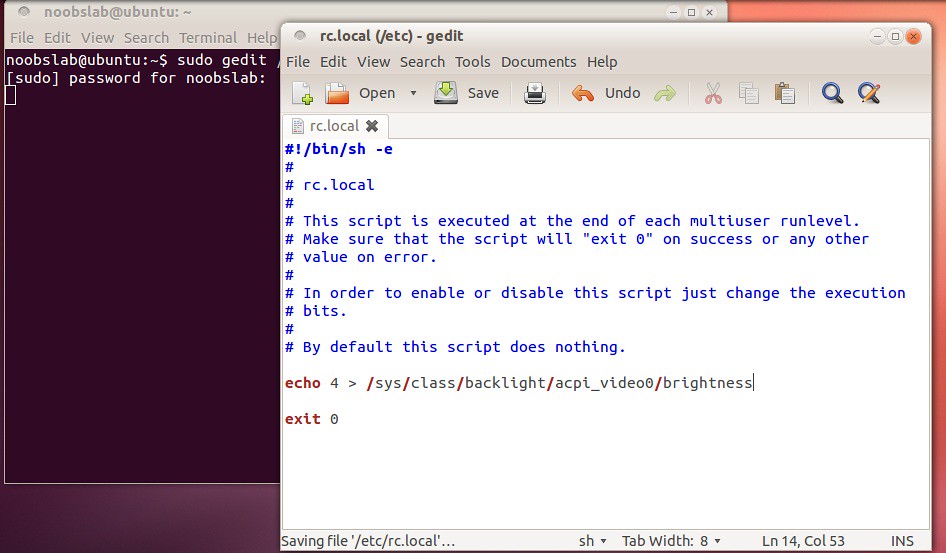
Ubuntu doesn't save screen brightness due to hardware compatibility, At every login you have to change brightness. So here is tweak to save screen brightness in Ubuntu.

To Save Screen Brightness in Ubuntu open Terminal (Press Ctrl+Alt+T) and copy the following commands in the Terminal:
  • sudo gedit /etc/rc.local
Add this before the last line "exit 0":
echo 4 > /sys/class/backlight/acpi_video0/brightness
ubuntu screen brightness


3: Add other Media Player to Ubuntu Sound Menu
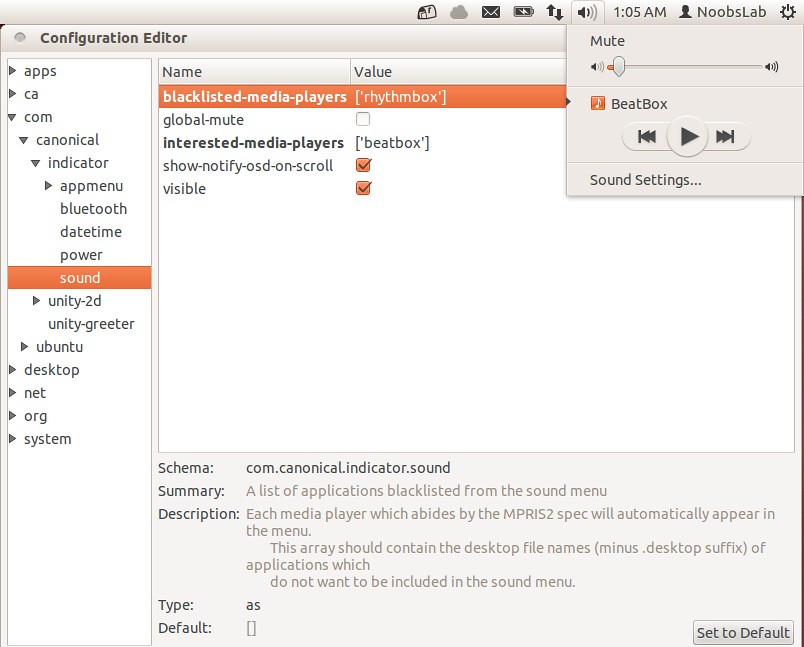
To Add BeatBox in sound menu open Terminal (Press Ctrl+Alt+T) and copy the following commands in the Terminal:
  • sudo apt-get install dconf-tools
Go to Dash and open "Dconf-Editor"

Type your Interested Player in (interested-media-player) and you can remove any media player by writing name in (blacklisted-media-players). See following picture
beatbox


4: Enable Global Menu for LibreOffice in Ubuntu 12.04
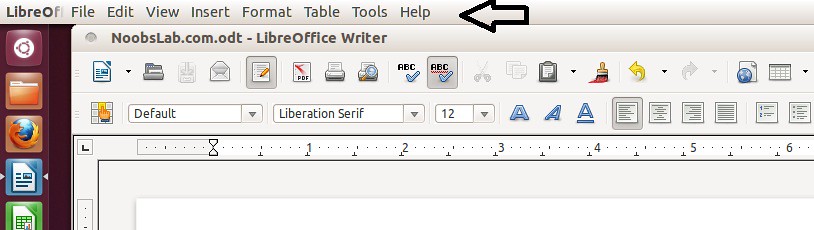
By default LibreOffice doesn't support global menu, So you can enable Global Menu easily.

To enable Global Menu for LibreOffice open Terminal (Press Ctrl+Alt+T) and copy the following commands in the Terminal:
  • sudo apt-get install lo-menubar
libreoffice


5: Open as Administrator in Ubuntu 12.04 Precise Pangolin
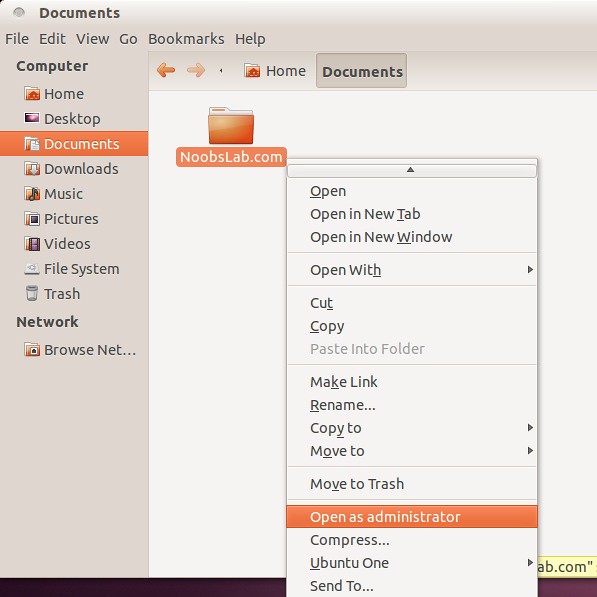
If you want to open files and folders "Open as Administrator". You can do easily.
To add "Open as Aministrator" entry open Terminal (Press Ctrl+Alt+T) and copy the following commands in the Terminal:
  • wget http://dl.dropbox.com/u/53319850/NoobsLab.com/libnautilus-gksu.so
  • sudo cp libnautilus-gksu.so /usr/lib/nautilus/extensions-3.0/
ubuntu root
After that Restart Ubuntu.

That's it, Enjoy

Thursday, 12 April 2012

Install LibreOffice 3.5.2 on Ubuntu/Linux Mint via PPA

Install LibreOffice 3.5.2 on Ubuntu 12.04 Precise/11.10 Oneiric Ocelot/Any Ubuntu Version/Linux Mint


New Features and Fixes:
- Writer
  • displaying non-printable characters to the end line to change the spaces simply
  • better support for Persian and Arabic characters
  • The window also displays the properties of the image resolution in PPI
  • improved UI for creating, removing, editing and display of edges and end-page, headers and footers without having to change the formatting of the pages
  • the counter of the words is updated in real time as you write
  • improved the function of AutoText when working with formulas
  • The Print window now displays the current page by default
- Calc
  • support up to 10,000 sheets, with improved performance in tasks involving very sheets
  • the notification of errors in the formulas entered is visually more pleasing and more help in correcting
  • new option to specify the default number of sheets in the new documents
  • the bar for the insertion of the formulas can be extended over multiple lines
  • best representation of the curved lines in the graphs, lostandard supporting ODF 1.2
  • it is now possible to copy a single cell to multiple cells
- Impress/Draw
  • The elliptical arcs are imported and displayed correctly (the first were ignored and not supported)
  • better management of the list of custom animations that because of the UI rendered tedious and longer than their creation
  • support palettes and other integrated properties, a choice can now be saved with the file ODF rather than only to external files
  • Impress now starts by default without displaying the wizard to create the presentation, however, changed option

To Install LibreOffice on Ubuntu/Linux Mint open Terminal (Press Ctrl+Alt+T) and copy the following commands in the Terminal:
  • sudo add-apt-repository ppa:libreoffice/ppa
  • sudo apt-get update
  • sudo apt-get install libreoffice libreoffice-gnome

Download Libreoffice for other Distro's
Enjoy

Thursday, 15 March 2012

Install LibreOffice 3.5.1 on Ubuntu/Linux Mint (New Release)

Install LibreOffice 3.5.1 on Ubuntu 12.04 Precise/11.10 Oneiric Ocelot/Any Ubuntu Version/Linux Mint


New Features and Fixes:
- Writer
  • displaying non-printable characters to the end line to change the spaces simply
  • better support for Persian and Arabic characters
  • The window also displays the properties of the image resolution in PPI
  • improved UI for creating, removing, editing and display of edges and end-page, headers and footers without having to change the formatting of the pages
  • the counter of the words is updated in real time as you write
  • improved the function of AutoText when working with formulas
  • The Print window now displays the current page by default
- Calc
  • support up to 10,000 sheets, with improved performance in tasks involving very sheets
  • the notification of errors in the formulas entered is visually more pleasing and more help in correcting
  • new option to specify the default number of sheets in the new documents
  • the bar for the insertion of the formulas can be extended over multiple lines
  • best representation of the curved lines in the graphs, lostandard supporting ODF 1.2
  • it is now possible to copy a single cell to multiple cells
- Impress/Draw
  • The elliptical arcs are imported and displayed correctly (the first were ignored and not supported)
  • better management of the list of custom animations that because of the UI rendered tedious and longer than their creation
  • support palettes and other integrated properties, a choice can now be saved with the file ODF rather than only to external files
  • Impress now starts by default without displaying the wizard to create the presentation, however, changed option

    Now Download Libreoffice from following link

    Tuesday, 14 February 2012

    Install LibreOffice 3.5 on Ubuntu/Linux Mint (New Released)

    Install LibreOffice 3.5 on Ubuntu 12.04/11.10 Oneiric Ocelot/Any Ubuntu Version/Linux Mint


    New Features and Fixes:
    - Writer
    • displaying non-printable characters to the end line to change the spaces simply
    • better support for Persian and Arabic characters
    • The window also displays the properties of the image resolution in PPI
    • improved UI for creating, removing, editing and display of edges and end-page, headers and footers without having to change the formatting of the pages
    • the counter of the words is updated in real time as you write
    • improved the function of AutoText when working with formulas
    • The Print window now displays the current page by default
    - Calc
    • support up to 10,000 sheets, with improved performance in tasks involving very sheets
    • the notification of errors in the formulas entered is visually more pleasing and more help in correcting
    • new option to specify the default number of sheets in the new documents
    • the bar for the insertion of the formulas can be extended over multiple lines
    • best representation of the curved lines in the graphs, lostandard supporting ODF 1.2
    • it is now possible to copy a single cell to multiple cells
    - Impress/Draw
    • The elliptical arcs are imported and displayed correctly (the first were ignored and not supported)
    • better management of the list of custom animations that because of the UI rendered tedious and longer than their creation
    • support palettes and other integrated properties, a choice can now be saved with the file ODF rather than only to external files
    • Impress now starts by default without displaying the wizard to create the presentation, however, changed option

    First of all remove old office with following command:
    • sudo apt-get autoremove libreoffice libreoffice-core
    Now Download Libreoffice from following link


    Just the Life of Eddie Copyright © 2012 Best Celebrity Wallpaper -- Powered by Blogger