Warung Bebas
Showing posts with label media player. Show all posts

Friday, 14 December 2012

VLC 2.0.5 Released, Install in Ubuntu 12.10/12.04/Linux Mint

Install VLC 2.0.5 Media Player in Ubuntu 12.10 Quantal/13.04 Raring/Linux Mint 14 and VLC 2.0.3 for Ubuntu 12.04 Precise Pangolin/11.10 Oneiric Ocelot/Linux Mint 13/12

VLC media player (initially VideoLAN Client) is a highly portable multimedia player for various audio and video formats (MPEG, DivX/Xvid, Ogg, and many more) as well as DVDs, VCDs, and various streaming protocols. However in recent years it has also become a extremely powerful server to stream live and on demand video in several formats to our network and the Internet.
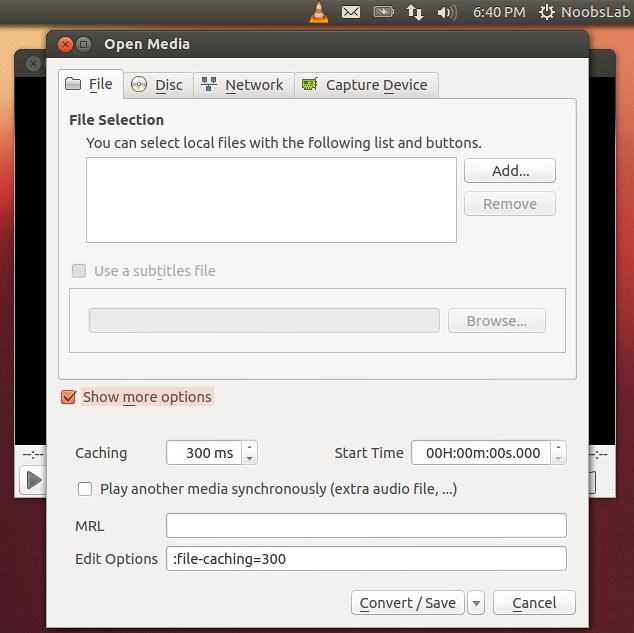
vlc

vlc

Features:
  • Simple, fast and powerful media player.
  • Plays everything: Files, Discs, Webcams, Devices and Streams.
  • Plays most codecs with no codec packs needed:
    • MPEG-2, DivX, H.264, MKV, WebM, WMV, MP3...
  • Runs on all platforms: Windows, Linux, Mac OS X, Unix...
  • Completely Free, 0 spyware, 0 ads and no user tracking.
  • Can do media conversion and streaming.
  • More info.
What's new in this release:
  • Improve reliability for RTSP streams sent by some IP cameras
  • Fix DVB-S delivery system detection
  • Fix playback initial synchronization with PulseAudio
  • Fix file output bug affecting floating point on big endian systems
  • Fix crash in Freetype with embedded fonts
  • Fix wrong aspect ratio in some cases
  • Fix Mpeg-2 audio and video encoders initialization
  • Fix crash with some embedded subtitle fonts
  • Fix SWF potential crash on malformed files
  • Fix some MKV crashes when ordered editions have empty or broken links
  • Fix division by 0 in AIFF demuxer
  • Fix buffer overflow in HTML subtitles parser
  • Fix crash with some embedded subtitle fonts

To install VLC in Ubuntu/Linux Mint open Terminal (Press Ctrl+Alt+T) and copy the following commands in the Terminal:
  • sudo add-apt-repository ppa:videolan/stable-daily
  • sudo apt-get update
  • sudo apt-get install vlc
That's it, Enjoy
Source: videolan

Monday, 3 September 2012

Install Xnoise 0.2.9 lightweight Media Player in Ubuntu/Linux Mint (New Release)

Install Xnoise 0.2.9 lightweight Media Player in Ubuntu 12.10 Quantal/Ubuntu 12.04 Precise/11.10 Oneiric/Linux Mint 13/12

Xnoise, a lightweight music player with minimal interface has been updated bringing in many new features and fixes. Xnoise is written in Vala and supports video playback making it one stop media application. Xnoise is a media player for GTK+ with a slick GUI, great speed and lots of features.

xnoise
Features:
  • Fast searchable media library
  • Music and Video support
  • 'Smart playlists' for last played and most played tracks
  • ID3 tag editing
  • Automatic album art fetching
  • 'Now playing' pane
  • State restore
  • Can play any GStreamer media
  • Media key support
  • Lightweight and speedy
  • Plugins for UbuntuOne Music Store, MPRIS, LastFm (album art and scrobbling), Lyrics fetching, Notifications, Ubuntu Soundmenu, and so on.
  • And more!
What's new in this Release:
  • Redesign GUI for Settings-Dialog and for Add-Media-Dialog
  • use strip function on artist and album imports
  • Extend media import API
  • Extend item handler API
  • Add fix for window hiding/howing (Tal)
  • Update portugse translation (Sergio Marques)
  • Activate standard item handlers for dynamic playlists, too
  • Context menus for dynamic playlists
  • Add query interface for dynamic playlists
  • Fix keyboard opened menus for tracklist and musicbrowser
  • Use nautilus feature (if available) for file indication
  • Add FAQ entry to help menu
  • Magnatune: add support for �speechless� streaming with user login
  • Magnatune: album downloads for registered users
  • Magnatune: add online change monitoring
  • Magnatune: use album images in Magnatune plugin
  • Magnatune: use genre in search/filtering
  • Magnatune: change store location of db
  • Update packaging data
  • Replace hard coded keycodes with the (now available) Gdk.Key.* constants
  • Recommend tumbler thumbnailing in packaging
  • Update debian package creation script (Tal)
  • Code cleanups
  • Various bug fixes

To Install Xnoise Media Player in Ubuntu/Linux Mint Open Terminal (Press Ctrl+Alt+T) and copy the following commands in the Terminal:
  • sudo add-apt-repository ppa:shkn/xnoise
  • sudo apt-get update
  • sudo apt-get install xnoise
For other distro's check out site of Xnoise.
Enjoy

Friday, 10 August 2012

Install BeatBox 0.6 in Ubuntu/Linux Mint (New Release)

Install BeatBox Player in Ubuntu 12.04 Precise/Linux Mint 13

BeatBox is a Audio player for the linux operating system that is fast, simple, and beautiful. BeatBox is an easy to use, stable, fast and good looking music library organizer written in vala.
Features include:
  • Sound Menu support
  • Two Views � Album art and �list�
  • CD Playback
  • iPod Syncing
  • Auto-fetching of missing album art
  • Album art renderer in �List View�
  • Scrobble support
  • Equaliser

Release Notes 0.6, Some of the new noticeable features are:
  • Shuffle is no longer visual.
  • New top display UI.
  • Closing while playing hides the window, and a new exit app menu option allows you to force close the app.
  • Can now be set as default music player
  • Faster startup time
  • Option to eject devices from sidebar
  • Nicer album view popup
  • Sidebar inline toolbar

To install BeatBox in Ubuntu 12.04/Mint 13 open Terminal (Press Ctrl+Alt+T) and copy the following commands in the Terminal:
  • sudo add-apt-repository ppa:sgringwe/beatbox
  • sudo apt-get update
  • sudo apt-get install beatbox
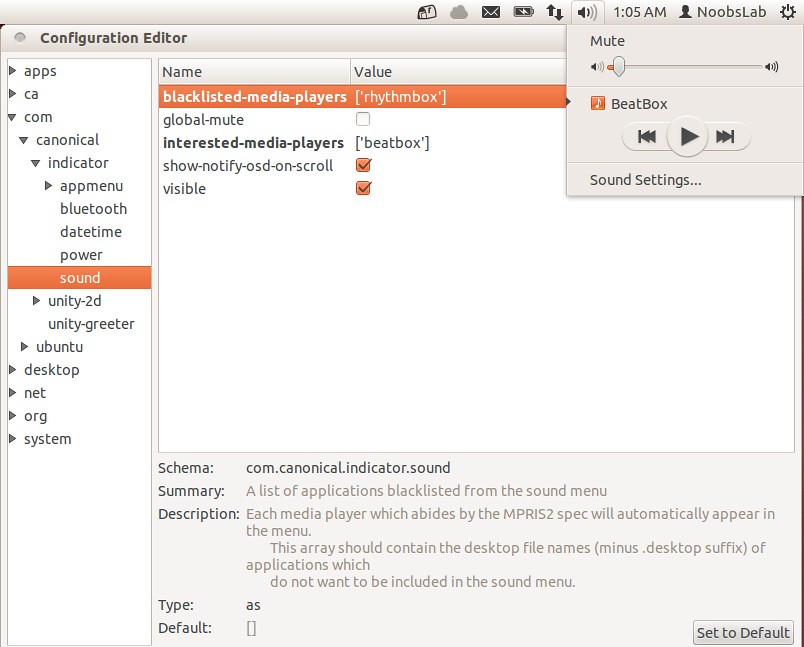
To add BeatBox in sound menu do following, Enter following command to install dconf-tools:
  • sudo apt-get install dconf-tools
Go to Dash open "Dconf-Editor" and see the following picture
beatbox

Monday, 28 May 2012

Install XNoise 0.2.2 in Ubuntu/Linux Mint (New Release)

Install Xnoise 0.2.2 lightweight Media Player for Ubuntu 12.04/11.10/11.04/10.10/Linux Mint

Xnoise, a lightweight music player with minimal interface has been updated bringing in many new features and fixes. Xnoise is written in Vala and supports video playback making it one stop media application.

xnoise

Features:
  • MPRIS v1/v2 DBus interfaces
  • Notifications
  • Window title setting
  • Video support
  • Automatic album art fetching
  • 'Now playing' pane
  • Fast library (metadata) search
  • State restore
  • ID3 tag editing
  • Lyrics fetching
  • Can play any GStreamer media
  • Plugin Support
  • Ubuntu Ayatana Soundmenu
  • Media key support
  • Lightweight and speedy
  • And more!

To Install Xnoise Media Player on Ubuntu/Linux Mint Open Terminal (Press Ctrl+Alt+T) and copy the following commands in the Terminal:
  • sudo add-apt-repository ppa:shkn/xnoise
  • sudo apt-get update
  • sudo apt-get install xnoise
For other distro's check out site of Xnoise.
Enjoy

Friday, 4 May 2012

Some More Tweaks for Ubuntu 12.04 Precise Pangolin

Previous Shared Important Tweaks to do after install of Ubuntu 12.04
ubuntu tweaks

1: Enable Dodge Windows in Ubuntu 12.04 Precise Pangolin
Dodge Windows option is not available in Ubuntu 12.04, Only you can autohide launcher.
Here is easy tweak for dodge windows or dodge active windows.

dodge windows

To Enable Dodge Windows in Ubuntu 12.04 open Terminal (Press Ctrl+Alt+T) and copy the following commands in the Terminal:
  • sudo add-apt-repository ppa:ikarosdev/unity-revamped
  • sudo apt-get update
  • sudo apt-get dist-upgrade
To revert changes back enter following commands:
  • sudo apt-get install ppa-purge
  • sudo ppa-purge ppa:ikarosdev/unity-revamped


2: Save Screen Brightness of Laptop in Ubuntu
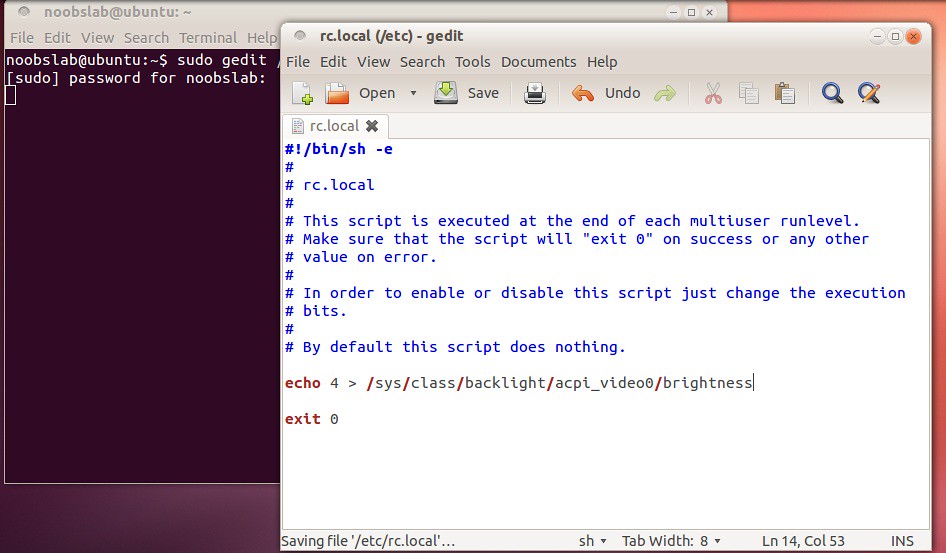
Ubuntu doesn't save screen brightness due to hardware compatibility, At every login you have to change brightness. So here is tweak to save screen brightness in Ubuntu.

To Save Screen Brightness in Ubuntu open Terminal (Press Ctrl+Alt+T) and copy the following commands in the Terminal:
  • sudo gedit /etc/rc.local
Add this before the last line "exit 0":
echo 4 > /sys/class/backlight/acpi_video0/brightness
ubuntu screen brightness


3: Add other Media Player to Ubuntu Sound Menu
To Add BeatBox in sound menu open Terminal (Press Ctrl+Alt+T) and copy the following commands in the Terminal:
  • sudo apt-get install dconf-tools
Go to Dash and open "Dconf-Editor"

Type your Interested Player in (interested-media-player) and you can remove any media player by writing name in (blacklisted-media-players). See following picture
beatbox


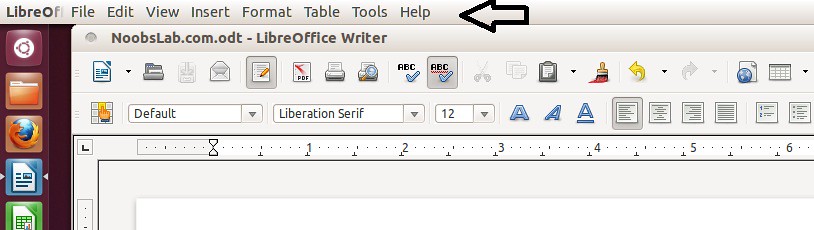
4: Enable Global Menu for LibreOffice in Ubuntu 12.04
By default LibreOffice doesn't support global menu, So you can enable Global Menu easily.

To enable Global Menu for LibreOffice open Terminal (Press Ctrl+Alt+T) and copy the following commands in the Terminal:
  • sudo apt-get install lo-menubar
libreoffice


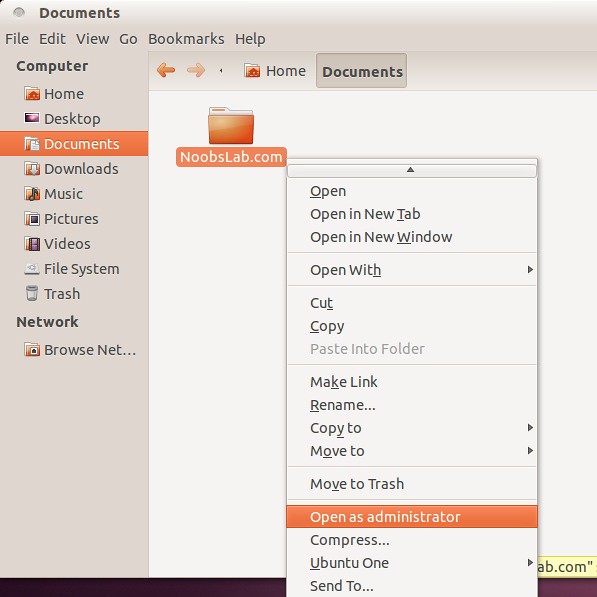
5: Open as Administrator in Ubuntu 12.04 Precise Pangolin
If you want to open files and folders "Open as Administrator". You can do easily.
To add "Open as Aministrator" entry open Terminal (Press Ctrl+Alt+T) and copy the following commands in the Terminal:
  • wget http://dl.dropbox.com/u/53319850/NoobsLab.com/libnautilus-gksu.so
  • sudo cp libnautilus-gksu.so /usr/lib/nautilus/extensions-3.0/
ubuntu root
After that Restart Ubuntu.

That's it, Enjoy

Thursday, 5 April 2012

Install Xnoise Media Player on Ubuntu 12.04/Ubuntu 11.10/Linux Mint

Install Xnoise 0.2.0 lightweight Media Player for Ubuntu 12.04/11.10/11.04/10.10/Linux Mint

Xnoise, a lightweight music player with minimal interface has been updated bringing in many new features and fixes. Xnoise is written in Vala and supports video playback making it one stop media application.

xnoise

Features:
  • MPRIS v1/v2 DBus interfaces
  • Notifications
  • Window title setting
  • Video support
  • Automatic album art fetching
  • 'Now playing' pane
  • Fast library (metadata) search
  • State restore
  • ID3 tag editing
  • Lyrics fetching
  • Can play any GStreamer media
  • Plugin Support
  • Last.fm integration
  • Ubuntu Ayatana Soundmenu
  • Media key support
  • Lightweight and speedy
  • And more!

Changes in this Release:
  • added keybinding for increasing/decreasing playback volume
  • options to show track in file manager or trash it
  • new azlyrics plugin
  • refreshed Xnoise layout
  • merge cyclic-save-state plugin into Xnoise
  • support for dockable media sources (Categories: Playlists, Media Collection, Stores)
  • automatic thumbnail generation for videos
  • onboard dbus service (not bound to mpris)
  • redone application button for compact layout
  • added possibility to name streams on import
  • suport for tag embedded images
  • optimizations and bug fixes

To Install Xnoise Media Player on Ubuntu/Linux Mint Open Terminal (Press Ctrl+Alt+T) and copy the following commands in the Terminal:
  • sudo add-apt-repository ppa:shkn/xnoise
  • sudo apt-get update
  • sudo apt-get install xnoise
For other distro's check out site of Xnoise.
Enjoy

Friday, 23 March 2012

Install Banshee 2.4 in Ubuntu/Linux Mint

Install Banshee 2.4 on Ubuntu 12.04/11.10 Oneiric Ocelot/Ubuntu 11.04 Natty Narwhal/Linux Mint

Banshee music player

Banshee 2.4 is the culmination of six months' work by 35 developers, 38 translators and dozens of bug reporters and testers. It is a stable release, the successor to Banshee 2.0.
Play your audios and videos. Keep up with your podcasts and Internet radio. Discover new music and podcasts. Keep your portable device loaded with good stuff.

To install/upgrade open Terminal (Press Ctrl+Alt+T) and copy the following commands in the Terminal:
sudo add-apt-repository ppa:banshee-team/ppa
sudo apt-get update
sudo apt-get install banshee

or
sudo apt-get upgrade

Here is the Homepage of Banshee.
 

Just the Life of Eddie Copyright © 2012 Best Celebrity Wallpaper -- Powered by Blogger