Warung Bebas
Showing posts with label precise themes. Show all posts

Thursday, 5 April 2012

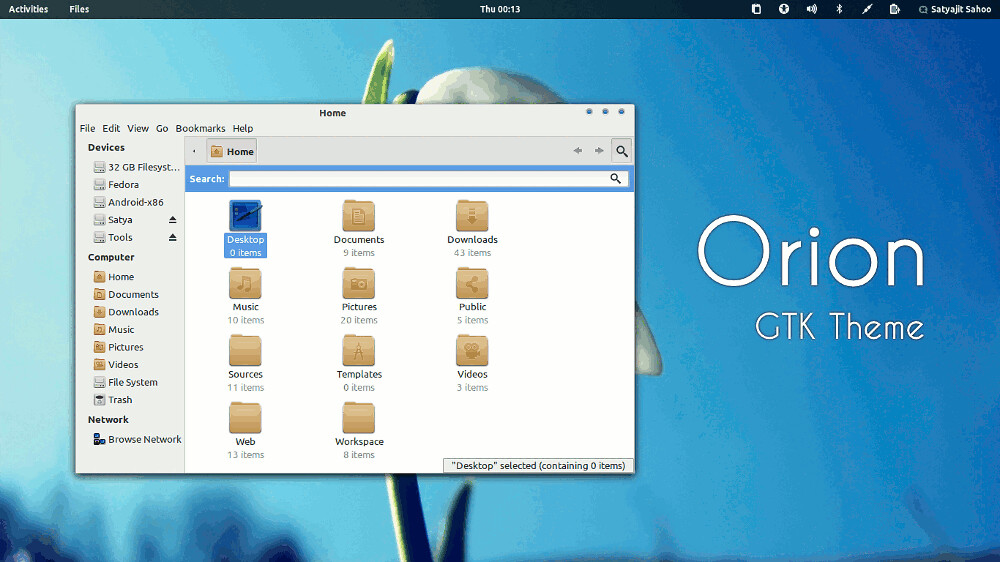
Install Orion GTK3 Themes on Ubuntu 12.04/11.10/Linux Mint

Install Orion GTK3 Themes on Ubuntu 12.04 Precise Pangolin/Ubuntu 11.10 Oneiric Ocelot/Linux Mint (GTK3)

Orion is a modern light theme for Gnome. It supports Gnome Shell, Unity, XFCE and Openbox. The theme is compatible with the latest GTK 3.4 and uses the Unico engine. It also includes a GTK 2.0 theme using Murrine engine.

ubuntu themes

To Install Orion on Ubuntu/Linux Mint open Terminal (Press Ctrl+Alt+T) and copy the following commands in the Terminal:
  • sudo apt-add-repository ppa:satyajit-happy/themes
  • sudo apt-get update
  • sudo apt-get install orion-gtk-theme
Enjoy

Saturday, 24 March 2012

Install WOW-2 Theme on Ubuntu/Linux Mint (Gtk3/2)

Install WOW-2 Theme on Ubuntu 12.04/11.10/11.04/10.10/Linux Mint (Gtk3/2)

ubuntu themes

The gtk3 theme is improved version of my gtk2 theme.My intention with this theme was to get easy on the eyes,not too light and not too dark,low contrast theme,but at the same time very usable theme.I put in the pack wow gtk2 theme although there is significant difference in colors. This is temporarily until I add wow-2 gtk2 theme.

Theme Support:
  • GTK3 (two versions)
  • GTK2 (two versions of old wow)
  • Metacity
  • Unity
  • Xfwm4
  • Openbox
Gtk3 themes requirement:
-GTK3 engine Unico

Gtk2 themes requirement:
- GTK2 engine Murrine
- GTK2 pixbuf engine

To Install Theme on Ubuntu/Linux Mint open Terminal (Press Ctrl+Alt+T) and copy the following commands in the Terminal:
  • mkdir ~/.themes
  • wget http://dl.dropbox.com/u/53319850/NoobsLab.com/wow-2.zip
  • unzip  wow-2.zip -d ~/.themes
Now open Gnome-Tweak-Tool to change theme.

For other Distro's download from here or download complete theme.


Just the Life of Eddie Copyright © 2012 Best Celebrity Wallpaper -- Powered by Blogger